Affiliate disclosure: This guide contains links to Carlinkit. If you buy through them, we may earn a commission at no extra cost to you. It does not change what we write: the CarPlay basics come from Apple, and the product details are the manufacturer’s own statements. See our Affiliate Disclosure.
How this guide was written: It was researched with AI assistance from the official pages listed under Sources, and every point was checked against those pages on September 29, 2026. We did not test any adapter or AI box, so product details are the manufacturer’s claims, not our findings. These are US-focused notes. See how we research.
Short answer: A wireless CarPlay adapter makes your car’s existing wired connection wireless: wireless CarPlay for an iPhone in a car with factory wired CarPlay, or wireless Android Auto for an Android phone in a car with factory wired Android Auto. It does not convert one into the other. An AI box does the same, then adds its own Android apps such as YouTube and Netflix, and usually needs internet.
Key takeaways
- Both start from a factory wired connection. The maker we checked describes both products as add-ons for cars with factory wired CarPlay or wired Android Auto. An iPhone gets wireless CarPlay and an Android phone gets wireless Android Auto; the adapter does not convert one into the other.
- An adapter is wireless only. An AI box also runs an Android system with its own apps, and needs data through a built-in SIM or your phone’s hotspot.
- Video is for when you are parked. NHTSA’s voluntary guidelines list showing video unrelated to driving among the tasks that interfere with safe driving.
- Neither is an Apple product. Apple’s own page points to aftermarket CarPlay stereos from seven brands, which replace the car’s stereo instead.
How CarPlay works, according to Apple
Apple describes CarPlay as a way to use your iPhone while you drive, with directions, calls, messages and music on the car’s display. Its page lists iPhones from the iPhone 5 onward and says more than 800 vehicle models support CarPlay. It also says you can add CarPlay to your current car with an aftermarket system, and names Alpine, Blaupunkt, Clarion, JVC, Kenwood, Pioneer and Sony. To check whether your car supports wireless CarPlay, Apple’s page says to see your dealer.
If your car does support it wirelessly, Apple’s setup steps are: press and hold the voice command button on the steering wheel, put the stereo in wireless or Bluetooth mode, turn on Wi-Fi on the iPhone, make sure Auto-Join is on for the CarPlay network, and choose your car under Settings, General, CarPlay.
What a wireless CarPlay adapter does
A wireless adapter plugs into the USB port your phone would normally use and creates the wireless link. Carlinkit’s Mini Ultra page describes it as a dongle for cars with factory wired CarPlay or wired Android Auto, and says it works with iPhone 6 and above on iOS 10 and above and with Android 11 and above. It lists BMW as an exception and Wi-Fi at 5.8 GHz. The maker’s 5.0 (2air) page says it fits “over 800” car models from 2016 with built-in wired CarPlay or Android Auto, except BMW, and that it does not convert wired CarPlay into Android Auto or the other way around.
What a CarPlay AI box does
An AI box does the same wireless job and adds a small computer. Carlinkit’s Tbox Plus page describes an Android 13 system with access to Google Play apps, and names YouTube and Netflix. It lists a built-in 4G module with a cloud SIM (10 GB of free data for 15 days, then paid top-ups through its app) and says you can also use your phone’s hotspot. The maker says the Tbox Plus fits 98% of vehicles with wired CarPlay or wired Android Auto, and that wireless Android Auto needs an Android phone on Android 10 or above. Its Tbox Max page describes switching between CarPlay, Android Auto and the Android system.
Adapter vs AI box, side by side
Everything below is what the manufacturer says on its own pages, not test results.
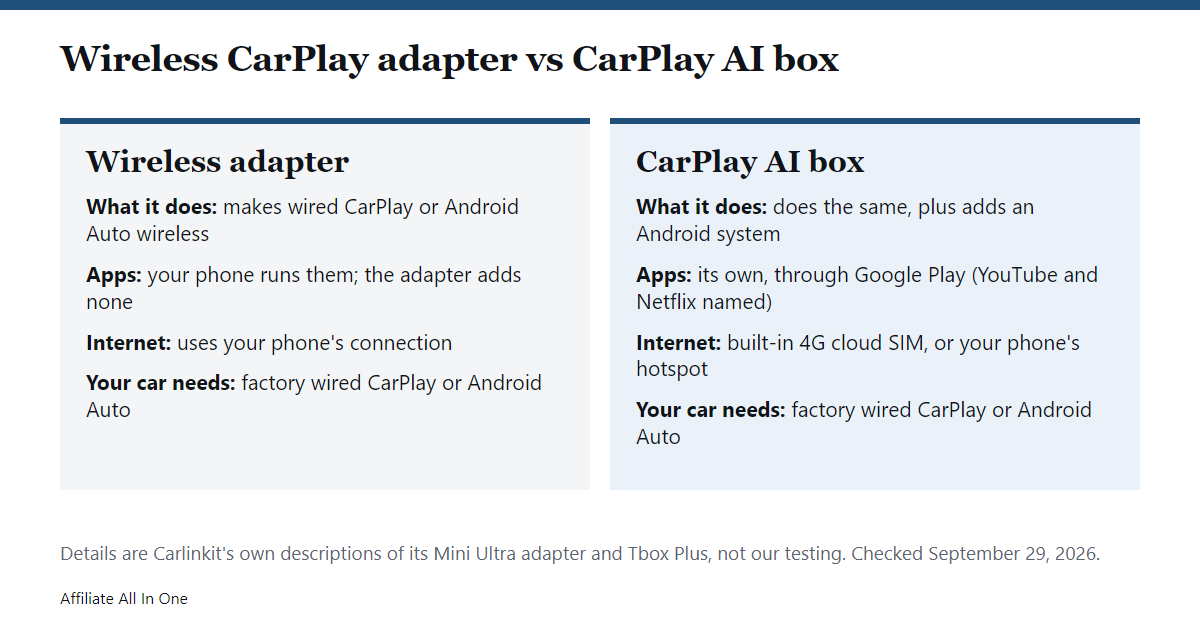
| Wireless adapter (Mini Ultra) | AI box (Tbox Plus) | |
|---|---|---|
| What it does | Makes wired CarPlay or Android Auto wireless | Does that, and adds an Android system |
| Own apps | No | Yes, through Google Play (YouTube and Netflix named) |
| Internet | Uses your phone | Built-in 4G cloud SIM, or your phone’s hotspot |
| Your car needs | Factory wired CarPlay or Android Auto, not BMW | Factory wired CarPlay or Android Auto |
| Warranty and returns | 1-year warranty, 30-day returns | 1-year warranty, 30-day returns |
| Store price (checked September 29, 2026) | Lower | Roughly two to three times higher in the listings we saw |
Prices change often, so check the seller’s page before you decide.
A note on watching video
An AI box makes it possible to stream video on the car’s screen. NHTSA’s driver distraction guidelines are nonbinding and voluntary, but they list displaying video not related to driving among the tasks that inherently interfere with a driver’s ability to operate a vehicle safely. That first phase covers factory-installed devices. NHTSA proposed a second phase for portable and aftermarket devices in December 2016. Laws about screens in vehicles vary by state, so the safe rule is to stream only when the car is parked.
Which one should you pick?
- Pick an adapter if your only goal is to stop plugging in your phone.
- Consider an AI box if you want an Android system on the car’s screen and accept the extra cost, the data connection, and the parked-only rule for video.
- Skip both if your car has no factory wired CarPlay or Android Auto, or if it is on the maker’s exclusion list.
If you want to look at Carlinkit’s range, see the Mini Ultra adapter or browse its CarPlay AI boxes on the official store.
Checklist before you buy
- CarPlay already works in your car with a cable.
- The product’s compatibility list covers your car’s make, model and year.
- Your iPhone meets the model’s stated requirement.
- You know whether it needs a data plan, and what that costs after any free period.
- You know the seller’s warranty and return window.
Frequently Asked Questions
Does an AI box replace CarPlay?
No. The maker’s pages describe it as adding an Android system next to CarPlay and Android Auto, and as letting you switch between them.
Do I need a data plan for an AI box?
Its Android apps need internet. Carlinkit says the Tbox Plus has a built-in 4G module with a cloud SIM that includes 10 GB for 15 days, after which you buy more data, or you can use your phone’s hotspot. An adapter uses your phone’s connection instead.
Will either work in any car?
No. The maker’s pages describe cars with factory wired CarPlay or wired Android Auto, and some models exclude BMW. Check the compatibility list for your exact car.
Is it safe to watch video with an AI box?
Only when parked. NHTSA’s voluntary guidelines list showing video unrelated to driving as a task that interferes with safe driving, and state laws vary. This is not legal advice.
Is an adapter the same as an aftermarket CarPlay stereo?
No. Apple’s aftermarket options, from brands such as Alpine, Kenwood, Pioneer and Sony, replace the car’s stereo. An adapter or AI box plugs into a CarPlay system your car already has.
Sources
All pages were checked on September 29, 2026.
- Apple: CarPlay
- Apple Support: Use CarPlay with your iPhone
- Carlinkit: Mini Ultra
- Carlinkit: 5.0 (2air)
- Carlinkit: Tbox Plus
- Carlinkit: CarPlay AI boxes
- Federal Register: NHTSA driver distraction guidelines, in-vehicle devices (2013)
- Federal Register: proposed guidelines for portable and aftermarket devices (2016)
Spotted something out of date? See our corrections policy, or browse more CarPlay and car tech guides.
Sources and last update
This article is written from official and primary sources, such as government agencies, standards bodies and manufacturer documentation, and is checked against them when it is updated. It is based on research, not hands-on testing. See how we research and our editorial policy.
Last updated: October 6, 2026