Affiliate disclosure: This guide contains links to Carlinkit. If you buy through them, we may earn a commission at no extra cost to you. It does not change what we write: the requirements below come from Google, and the adapter details are the manufacturer’s own statements. See our Affiliate Disclosure.
How this guide was written: It was researched with AI assistance from the official pages listed under Sources, and every requirement was checked against those pages on September 29, 2026. We did not test any adapter, so adapter details are the manufacturer’s claims, not our findings. Google lists the United States, Canada and the United Kingdom among the countries where Android Auto works. See how we research.
Short answer: Wireless Android Auto needs three things: an Android phone running Android 11 or newer with 5 GHz Wi-Fi, a car or stereo that supports wireless Android Auto, and a Bluetooth pairing the first time you connect. If your car only supports wired Android Auto, a wireless adapter that plugs into the car’s USB port can add the wireless connection.
Key takeaways
- Your phone: Google says wireless Android Auto works with any phone running Android 11 that also supports 5 GHz Wi-Fi. Wired Android Auto only needs Android 9.0 or higher.
- Your car: it must support Android Auto. Google says to ask your car maker whether your specific model supports the wireless version.
- Adapters: the ones we looked at work only with cars that already have factory wired Android Auto, so check that a cable works first.
- iPhones cannot use Android Auto. They use Apple CarPlay instead.
What wireless Android Auto is
Android Auto puts navigation, calls, messages and music from your phone on the car’s display. Normally you connect the phone with a USB cable. In the wireless version you skip the cable: you pair the phone with the car over Bluetooth the first time, and after that the phone connects wirelessly. Android Auto is built into supported phones, so you do not need to download it, and Google says it is not available on phones running Android (Go edition).
What your phone needs
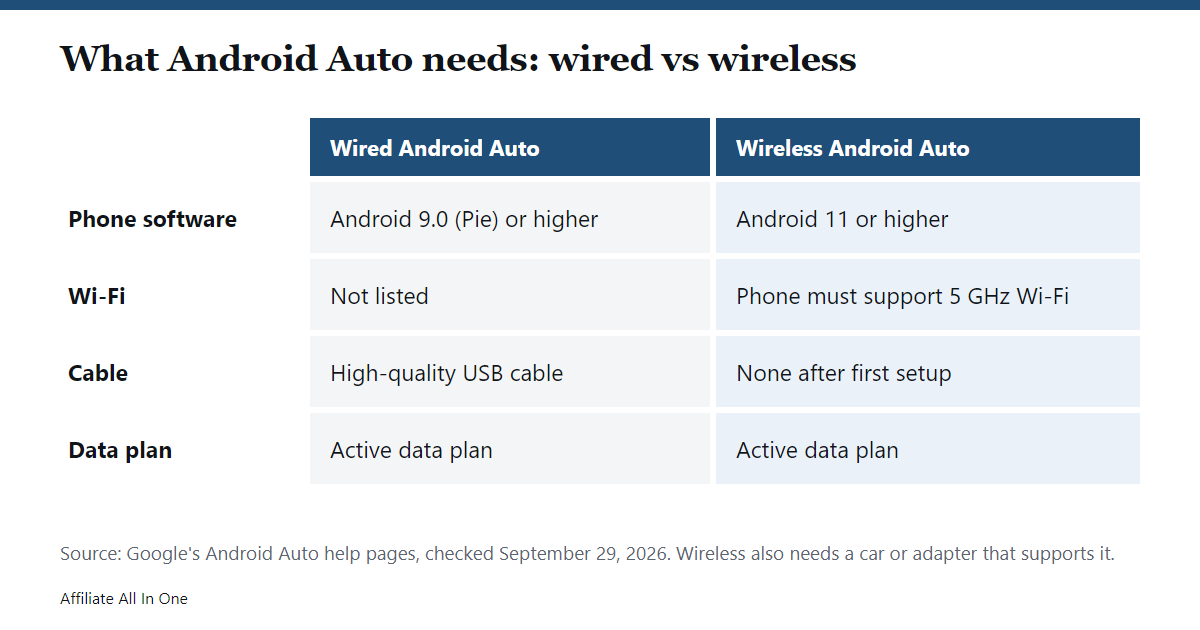
| Requirement | Wired | Wireless |
|---|---|---|
| Android version | Android 9.0 (Pie) or higher | Any phone running Android 11 |
| Data plan | Active data plan | Active data plan |
| Wi-Fi | Not listed | Phone must support 5 GHz Wi-Fi |
| Cable | High-quality USB cable | None after setup |
Source: Google’s Android Auto help page, “Get started with Android Auto”. To find out whether your phone supports 5 GHz Wi-Fi, Google says to contact the phone’s manufacturer.
What your car or stereo needs
Google says a compatible car or stereo is required for both versions, and points you to its vehicle and stereo compatibility lists. For the wireless version, its help page says to contact your car manufacturer to confirm that your specific model supports wireless Android Auto.
A practical first test, and our own suggestion rather than a Google step: plug your phone into the car with a cable. If Android Auto starts, your car at least supports the wired version, which matters for adapters (see below).
Three ways to get wireless Android Auto
- A car that already supports it. Some cars include wireless Android Auto from the factory. Confirm with the manufacturer, as Google advises.
- An adapter for a car with wired Android Auto. A small device plugs into the USB port your phone would normally use and connects to your phone wirelessly. The details below come from Carlinkit’s own product pages.
- A compatible stereo. Google’s help page refers to compatible “cars or stereos,” so check the stereo maker’s documentation for wireless support before you buy one.
What a wireless adapter can and cannot do
Carlinkit describes its adapters as devices for cars that already have factory wired Android Auto. Its A2A page says it is for cars with factory wired Android Auto, and its Mini Ultra page says it connects through the car’s USB-A or Type-C port. These are the manufacturer’s stated details, not test results:
| Model | Wireless Android Auto | Wireless CarPlay | Works with (per Carlinkit) | Wi-Fi |
|---|---|---|---|---|
| A2A | Yes | Not listed | Cars with factory wired Android Auto, from 2016 | 5 GHz bands |
| Mini Ultra | Yes | Yes | Factory wired CarPlay or wired Android Auto, except BMW; Android 11 and above | 5.8 GHz |
| 5.0 (2air) | Yes | Yes | “Over 800” car models from 2016 with built-in wired CarPlay or Android Auto, not BMW | 2.4 and 5 GHz |
Carlinkit’s pages also list a one-year warranty and 30-day returns. Three limits are worth knowing:
- It needs wired support first. These adapters do not add Android Auto to a car that has neither wired Android Auto nor wired CarPlay.
- It does not switch systems. Carlinkit says the 5.0 does not convert wired Android Auto to CarPlay, or wired CarPlay to Android Auto.
- Your phone still has to qualify. Google’s Android 11 and 5 GHz Wi-Fi requirements apply no matter what adapter you use.
Other brands sell similar adapters, so compare the same details on any product you consider. If you want to look at Carlinkit’s range, see its wireless Android Auto adapters or the A2A Android Auto adapter on its official store.
How to set it up the first time
- Check that your phone runs Android 11 or newer and supports 5 GHz Wi-Fi.
- Check that your car or stereo supports Android Auto, and, if you are buying an adapter, that it works over a cable first.
- If you use an adapter, plug it into the car’s USB port that supports Android Auto.
- Park the car with the infotainment system on, and keep your phone’s Bluetooth, Wi-Fi and Location turned on while you set up, as Google recommends. Then pair the phone with the car over Bluetooth.
- Follow the prompts on the car display. Google says Android Auto should start within a few seconds of pairing. Carlinkit says its Mini Ultra then connects automatically each time you start the car, once you have kept Bluetooth and Wi-Fi enabled for about 10 seconds after the first setup.
Checklist before you buy an adapter
- Your phone runs Android 11 or newer and has 5 GHz Wi-Fi.
- Android Auto already works in your car with a cable.
- The adapter’s listed compatibility covers your car’s make, model and year, and is not excluded, as BMW is for two of the Carlinkit models above.
- You know the seller’s return window and warranty.
Frequently Asked Questions
Do iPhones work with Android Auto?
No. Android Auto requires an Android phone, according to Google. iPhone owners use Apple CarPlay, which is a separate system.
What Android version do I need for wireless Android Auto?
Google says wireless projection works with any phone running Android 11, provided the phone also supports 5 GHz Wi-Fi and has an active data plan. Wired Android Auto needs Android 9.0 or higher.
Can an adapter add Android Auto to a car that does not have it?
Not according to the adapter makers we checked. Carlinkit’s pages describe its adapters as working with cars that already have factory wired Android Auto or wired CarPlay, so confirm your car supports one of them first.
Can I turn wired CarPlay into wireless Android Auto?
Carlinkit says its 5.0 adapter does not convert wired CarPlay into Android Auto, or the other way around. It only makes each system wireless.
Is Android Auto available in the US, Canada and the UK?
Yes. Google’s help page lists the United States, Canada and the United Kingdom among the countries where Android Auto is available.
Sources
All pages were checked on September 29, 2026.
- Google: Get started with Android Auto (requirements, countries)
- Google: Set up Android Auto (first-time wireless pairing)
- Google: Android Auto vehicle compatibility
- Carlinkit: A2A Android Auto adapter
- Carlinkit: Mini Ultra
- Carlinkit: 5.0 (2air)
Spotted something out of date? See our corrections policy, or browse more CarPlay and car tech guides.
Sources and last update
This article is written from official and primary sources, such as government agencies, standards bodies and manufacturer documentation, and is checked against them when it is updated. It is based on research, not hands-on testing. See how we research and our editorial policy.
Last updated: September 30, 2026