How this guide was written: It was researched with AI assistance from Apple’s own battery and service pages, listed under Sources, and checked against them on September 29, 2026. We did not test any battery. This guide has no affiliate links. Apple can change these figures, so the “Updated” date at the top matters. See how we research.
Short answer: Maximum Capacity is how much charge your iPhone’s battery can hold compared with when it was new. Apple designs iPhone 15 batteries to keep 80% of their capacity at 1,000 full charge cycles (500 cycles for iPhone 14 and earlier) under ideal conditions. Apple gives no single percentage at which to replace the battery. It shows a message when battery health is significantly degraded.
Key takeaways
- Find it in Settings. Open Settings, tap Battery, then tap Battery Health.
- 80% is a design target, not a replacement rule. Apple says batteries are designed to retain 80% at 500 or 1,000 cycles. It does not tell you to replace the battery at 80%.
- A “degraded” message is not a safety warning. Apple says you can keep using the phone, but you may notice more battery and performance problems.
- Heat is the habit to avoid. Apple names temperatures above 95°F (35°C) as able to permanently reduce capacity.
What Maximum Capacity means
According to Apple’s iPhone battery and performance page, Maximum Capacity measures the battery’s capacity relative to when it was new. As the battery ages chemically, it holds less charge, which can mean fewer hours between charges. Apple also says a new iPhone can show slightly less than 100%, depending on how long passed between manufacture and activation.
Apple defines a charge cycle as using an amount of battery equal to 100% of its capacity. Apple says a complete cycle is normalized between 80% and 100% of original capacity, to account for the expected drop as the battery ages.
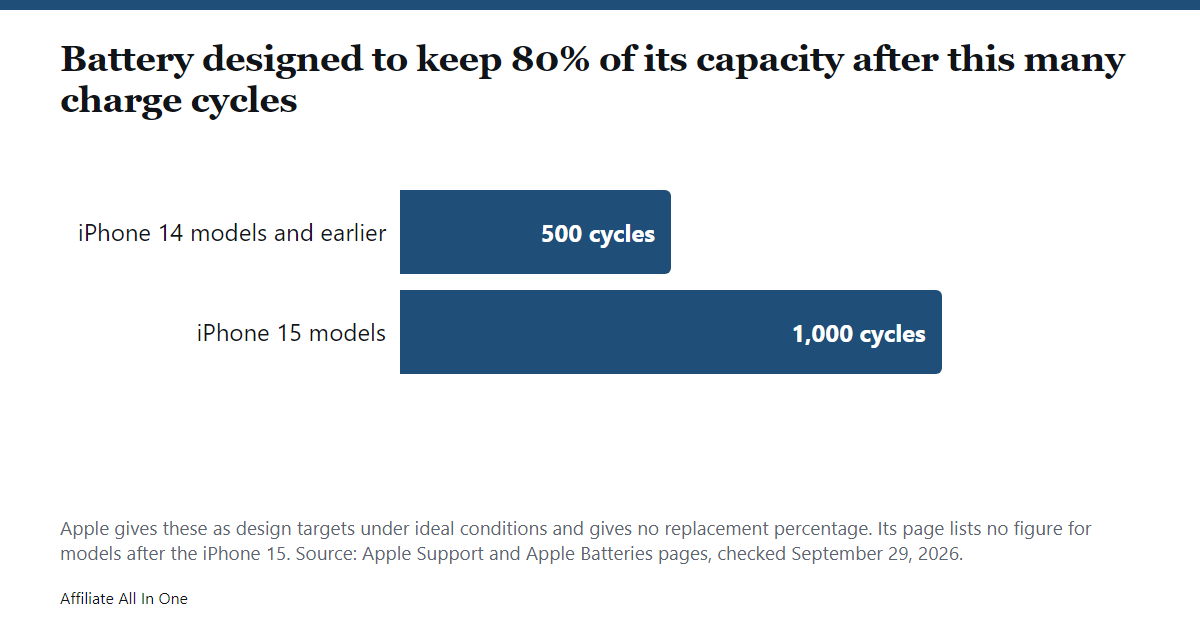
| iPhone | Designed to keep 80% of original capacity at |
|---|---|
| iPhone 14 models and earlier | 500 complete charge cycles |
| iPhone 15 models | 1,000 complete charge cycles |
Both figures are “under ideal conditions”, and Apple says the real percentage depends on how you use and charge the phone. Apple’s page lists no figure for models after the iPhone 15, so check Apple’s site for your model.
What the Battery Health messages mean
Below the capacity figure, the Battery Health screen has a Peak Performance Capability section. These are the messages Apple describes.
| What you see | What Apple says it means |
|---|---|
| Your battery is currently supporting normal peak performance | The battery can support normal peak performance and no performance management is applied |
| Performance management applied | The iPhone had an unexpected shutdown because the battery could not deliver the power needed at that moment, and iOS is limiting some performance to help prevent another one |
| Your battery’s health is significantly degraded | Battery health has dropped a lot. Apple says this does not indicate a safety issue and you can still use the battery, but you may notice more battery and performance issues. Apple suggests service |
| Unable to verify this iPhone has a genuine Apple battery | Applies to iPhone XS, XS Max, XR and later. The health information on the screen may not be accurate. Apple suggests having the battery checked |
Apple lists the older models where performance management is a setting you can see and turn off, and it points to a separate page for iPhone 11 and later, which we did not read. If you turn it off after an unexpected shutdown, Apple says it turns itself back on automatically the next time the phone shuts down unexpectedly. Apple also says the effects on newer models may be less noticeable.
In the most extreme cases, Apple says performance management can cause longer app launch times, lower frame rates while scrolling, a dimmer backlight, speaker volume lower by up to 3 dB, and a disabled camera flash. Apple lists cellular call quality, photo and video quality, GPS and Apple Pay as not affected.
When to think about replacing the battery
Apple does not publish a percentage at which to replace the battery. Its pages point to these signals instead:
- You see the “significantly degraded” message on the Battery Health screen.
- You need to charge more and more often. Apple’s service page says this is a sign it might be time for battery service.
- The phone has had unexpected shutdowns, or you notice the slowdowns listed above. Apple says replacing the battery can improve performance in that case.
Our own note, not Apple’s: Maximum Capacity is one number. A phone at 85% that lasts your whole day may not need service, while a phone at a higher number that keeps shutting down is worth having checked.
What service involves
Apple says the one-year warranty covers a defective battery. Its service page adds that the warranty does not cover batteries that wear down from normal use. Out of warranty, Apple offers battery service for a fee. Apple’s site has a cost estimator for each model, but it did not load for us, so we give no prices. Apple says Authorized Service Providers set their own fees, and that it guarantees its service and replacement parts for 90 days or the rest of your Apple warranty, whichever is longer.
How to slow battery aging
Apple says a battery’s chemical age depends on several factors, including its temperature history and charging pattern. These are the specific steps Apple gives.
| What to do | What Apple says |
|---|---|
| Keep Optimized Battery Charging on | It is on by default. It delays charging past 80% when your iPhone predicts it will stay plugged in for a long time, and needs at least 14 days to learn your routine |
| Set a Charge Limit (iPhone 15 and later) | Go to Settings, Battery, Charging. Choose a limit from 80% to 100% in 5% steps. Below 100%, the phone occasionally charges to 100% to keep its estimates accurate |
| Avoid heat | The ideal ambient range is 62°F to 72°F (16°C to 22°C). Temperatures above 95°F (35°C) can permanently damage capacity, and charging in high heat can damage it further |
| Take off a hot case | Some cases can trap heat while charging. If the phone gets hot, remove it from its case first |
| Store it at about 50% | For long-term storage, power the phone down and keep it below 90°F (32°C). For storage over six months, charge it to 50% every six months |
On iPhone 14 and earlier there is no Charge Limit. Apple says to open Settings, Battery, Battery Health & Charging, and use the Optimized Battery Charging switch. Apple also says cold weather can shorten battery life, but that this is temporary.
Frequently Asked Questions
What is a good iPhone battery health percentage?
Apple does not publish a “good” number. It says a new iPhone can show slightly under 100%, and that batteries are designed to keep 80% of capacity at 500 cycles (iPhone 14 and earlier) or 1,000 cycles (iPhone 15) under ideal conditions.
At what percentage should I replace my iPhone battery?
Apple gives no percentage. It shows a message when battery health is significantly degraded, and its service page says a need to charge more and more often can be a sign the battery needs service.
Does fast charging or wireless charging damage battery health?
The Apple pages we read do not single out either one. They point to heat, charging pattern and time spent fully charged. If your iPhone gets hot while charging, Apple suggests taking it out of its case.
Can a worn battery slow down my iPhone?
Yes, in some cases. Apple says an aged battery may not deliver peak power, and that iOS can then limit some performance to prevent unexpected shutdowns. Apple says replacing the battery can improve performance if you are affected.
Is it safe to keep using an iPhone with degraded battery health?
Apple says the “significantly degraded” message does not indicate a safety issue and that you can still use the battery, though you may notice more battery and performance problems.
Sources
All pages were checked on September 29, 2026.
- Apple Support: iPhone battery and performance (published June 1, 2026)
- Apple Support: About Charge Limit and Optimized Battery Charging on iPhone (published December 8, 2025)
- Apple: Maximizing battery life and lifespan
- Apple: Battery service and recycling
- Apple Support: iPhone battery service and repair
Spotted something out of date? See our corrections policy, or browse more Electronics guides.
Sources and last update
This article is written from official and primary sources, such as government agencies, standards bodies and manufacturer documentation, and is checked against them when it is updated. It is based on research, not hands-on testing. See how we research and our editorial policy.
Last updated: October 5, 2026