How this guide was written: It was researched with AI assistance from the SD Association’s own standards pages and charts, listed under Sources, and checked against them on September 30, 2026. We did not test any card. This guide has no affiliate links and does not recommend a brand. See how we research.
Short answer: The letters on an SD card mean different things. C, U and V numbers are guaranteed minimum sequential write speeds in MB/s, mainly for video: C10 and U1 mean 10, U3 and V30 mean 30, V90 means 90. A1 and A2 rate random speed for running apps. UHS-I, UHS-II and SD Express describe the bus speed. Use the class family your device asks for.
Key takeaways
- A class number is a floor, not a top speed. The SD Association says the class symbols indicate minimum writing speed.
- Match the label family your device names. The SD Association says a card of the same or a higher class in the same family works, but a different family does not guarantee the speed, even at the same 10 MB/s.
- Bus speed is a separate label. UHS-I, UHS-II, UHS-III and SD Express set how fast data can move between card and device.
- Capacity type matters for compatibility. An SDXC card needs an SDXC or SDUC device. It will not work in an SDHC-only device.
SD card speed chart: the labels at a glance
The SD Association defines four families of speed label. Each number is the minimum sequential write speed the card is designed to sustain, which matters most for recording video.
| Family | Labels | Minimum sequential write speed | Bus it is used with |
|---|---|---|---|
| Speed Class | C2, C4, C6, C10 | 2, 4, 6 and 10 MB/s | C10 is used in High Speed mode or faster |
| UHS Speed Class | U1, U3 | 10 and 30 MB/s | UHS bus modes (SDR50/DDR50 or faster) |
| Video Speed Class | V6, V10, V30, V60, V90 | 6, 10, 30, 60 and 90 MB/s | V6 and V10: High Speed and UHS; V30: UHS; V60 and V90: UHS-II or faster |
| SD Express Speed Class | E150, E300, E450, E600 | 150, 300, 450 and 600 MB/s | SD Express (PCIe/NVMe) |
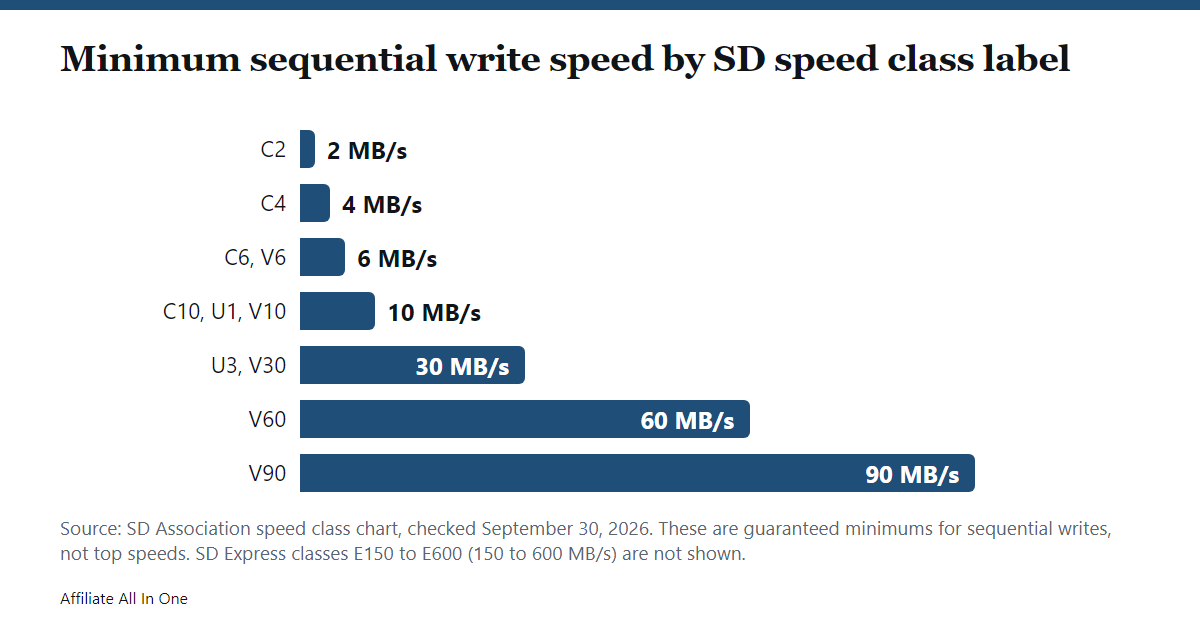
The SD Association says the newer families exist because memory technology changed: Speed Class and UHS Speed Class were built for older memory, while Video Speed Class and SD Express Speed Class are optimized for the latest NAND flash. So U3 and V30 share the same 30 MB/s minimum but belong to different families.
What “minimum” means, and why real speeds vary
The SD Association says the speed classes assure minimum sequential performance under conditions defined in the standard. Three cautions follow from its pages:
- The class is measured on sequential writes to an un-fragmented area. After many deletes and writes a card can become fragmented, and a device may not reach its class speed even when free space remains. The SD Association says rearranging the data or reformatting the card may be needed.
- The bus speed is a ceiling, not a promise. The SD Association notes that maximum speed differs from the bus interface speed and varies with card performance.
- Your device sets the average. The average write speed depends on the device and the operation it is performing, and on how other data is stored on the card.
Many cards also print a separate MB/s figure. The SD Association’s class pages do not cover that number, so check what a maker means by it before treating it as a guarantee.
Which class do you need?
Start with what the device says. The SD Association’s rule is to choose a card with the same class symbol as the device asks for, or a higher one in the same family. Its examples: a device that needs Speed Class 4 can use class 4, 6 or 10, and a device that needs UHS Speed Class 1 can use U1 or U3. A device that needs V10 can also run with a V30 card.
The rule stops at the family boundary. The SD Association says the expected write speed will not be available with a mix such as a Class 10 device with a U1 card, or a U1 device with a V10 card, even though all of them mean 10 MB/s. So if the manual asks for V30, a U3 card is not a guaranteed match.
The SD Association’s chart pairs higher classes with higher video formats, from standard video up to 8K, and adds that speeds vary with the recording or playback device’s requirements. That is why the device’s manual is the better guide than the video resolution alone.
Bus speed: UHS-I, UHS-II and SD Express
Bus speed is what the connection can carry. The SD Association lists these interfaces:
| Bus interface | Bus speed |
|---|---|
| Default Speed | 12.5 MB/s |
| High Speed | 25 MB/s |
| UHS-I | 50 MB/s (SDR50, DDR50) or 104 MB/s (SDR104) |
| UHS-II | 156 MB/s full duplex, 312 MB/s half duplex |
| UHS-III | 312 MB/s or 624 MB/s full duplex |
| SD Express | 985, 1,970 or 3,940 MB/s over PCIe (depending on version and lanes) |
The SD Association says cards work in hosts of other bus types, and that any high-speed card can be used in UHS-I, UHS-II or SD Express devices. To get the performance a device supports, it says to use a card that supports at least the device’s highest bus, so UHS-II devices perform best with UHS-II cards.
A1 and A2: for running apps
The Application Performance Class is different again. It measures random read and write, in IOPS (4 KB commands per second), which matters when apps run from the card, such as with Android’s Adoptable Storage feature.
| Class | Minimum random read | Minimum random write | Minimum sustained sequential write |
|---|---|---|---|
| A1 | 1,500 IOPS | 500 IOPS | 10 MB/s |
| A2 | 4,000 IOPS | 2,000 IOPS | 10 MB/s |
The SD Association says A2 uses command queuing and cache, applies to UHS SDHC and SDXC cards, and delivers A2 performance only when both the host and the card support A2. With an A1-only host, you get at least A1.
Capacity and compatibility
| Standard | Capacity | File system |
|---|---|---|
| SD | Up to 2 GB | FAT12, FAT16 |
| SDHC | Over 2 GB to 32 GB | FAT32 |
| SDXC | Over 32 GB to 2 TB | exFAT |
| SDUC | Over 2 TB to 128 TB | exFAT |
The compatibility rule runs one way. The SD Association says SDUC cards work only in SDUC devices, SDXC cards work in SDXC and SDUC devices, SDHC cards work in SDHC, SDXC and SDUC devices, and older SD cards work in all of them. It also strongly recommends its SD Memory Card Formatter over the formatting tools built into operating systems, and says generic tools may reduce performance. Full-size SD cards are 32 x 24 x 2.1 mm and microSD cards are 11 x 15 x 1.0 mm, and the same speed classes apply to both.
What to check before buying
- The class family in the device’s manual. Match that family, at the same class or higher.
- The capacity standard the device supports. An SDXC card will not work in an SDHC-only device.
- The bus the device supports. The SD Association says to match the bus: UHS-II devices perform best with UHS-II cards, and a UHS-I-only device runs at its own bus speed.
- A1 or A2 if you will run apps from the card. A2 needs an A2 device.
- Format the card in the device or with the SD formatter, and expect speed to drop if it becomes fragmented.
Frequently Asked Questions
What does Class 10 mean on an SD card?
It is a Speed Class label meaning a minimum sequential write speed of 10 MB/s. The SD Association says Class 10 is used in High Speed mode or faster.
What is the difference between U1 and U3?
Both are UHS Speed Class labels. According to the SD Association’s chart, U1 means a minimum sequential write speed of 10 MB/s and U3 means 30 MB/s. Its rule allows a card of the same class or a higher one in the same family, so a U3 card can be used where a device asks for U1, but not the other way round. Class 10 is a different family with the same 10 MB/s minimum as U1, and the SD Association says mixing families, such as a Class 10 device with a U1 card, does not assure that speed.
Is U3 the same as V30?
They have the same 30 MB/s minimum sequential write speed, but they are different families. The SD Association says the expected write speed is not assured across families, so use the one your device names.
Will a faster card make my device faster?
Not necessarily. The SD Association says the actual speed varies with the card and the device, and that a device performs best with a card supporting at least its own bus. Our reading: a faster card cannot make a slower device bus faster.
Can I use an SDXC card in an older device?
Only if the device supports SDXC. The SD Association says SDXC cards work in SDXC and SDUC devices, and SDHC-only devices cannot use them.
What does A2 mean?
A2 is an Application Performance Class: a minimum of 4,000 random read IOPS and 2,000 random write IOPS, for running apps from the card. It needs an A2-capable device to deliver that.
Sources
All pages were checked on September 30, 2026.
- SD Association: Speed Class (including its speed class chart)
- SD Association: Speed Class Standards for Video Recording
- SD Association: Bus Speed (Default Speed, High Speed, UHS, SD Express)
- SD Association: Application Performance Class (including its A1 and A2 table)
- SD Association: Capacity (SD, SDHC, SDXC, SDUC)
- SD Association: SD, SDHC, SDXC and SDUC Card Capacity Choices (compatibility and formatter advice)
Spotted something out of date? See our corrections policy, or browse more Electronics guides.
Sources and last update
This article is written from official and primary sources, such as government agencies, standards bodies and manufacturer documentation, and is checked against them when it is updated. It is based on research, not hands-on testing. See how we research and our editorial policy.
Last updated: October 11, 2026