Affiliate disclosure: This guide contains two links to aosu, a security camera maker. If you buy through them, we may earn a commission at no extra cost to you. It does not change what we write: the storage details below are aosu’s own statements, labelled as such, and the security advice comes from CISA. See our Affiliate Disclosure.
How this guide was written: It was researched with AI assistance from the maker’s own pages and a U.S. government security page, listed under Sources, and checked against them on September 29, 2026. We did not test any camera. We use one brand as the worked example because its storage and plan pages are public; other brands work differently, so check each one. See how we research.
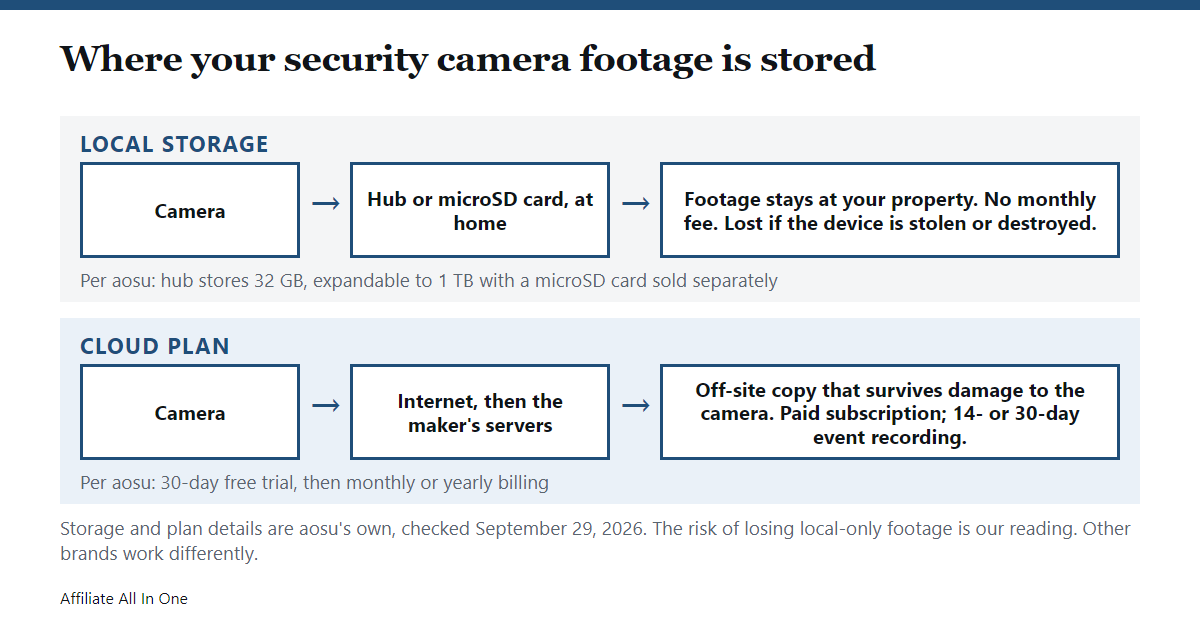
Short answer: A “no subscription” security camera records to storage you own instead of the maker’s cloud. That is usually a microSD card in the camera or a small hub connected to it. You avoid a monthly fee, but you give up off-site backup: if the only copy sits on a camera or hub that is stolen or destroyed, that footage is lost. Some smart features may cost extra.
Key takeaways
- “No subscription” describes storage, not everything. It usually means recordings can be kept locally without paying, not that every feature is free.
- Local storage needs hardware. In the example below, the no-subscription claim applies when the camera is used with the maker’s hub.
- The trade-off is off-site backup. The maker itself says cloud footage survives a damaged or stolen camera.
- Security still matters. CISA advises strong passwords, multi-factor authentication where offered, and up-to-date software.
Local storage vs a cloud plan
Every camera brand structures this differently, so this table uses one maker, aosu, as the example. All entries are the maker’s statements from its website, not our testing.
| Local storage (hub or card) | Cloud plan (aosuProtect+) | |
|---|---|---|
| Cost | No monthly fee. The maker says “No Subscription Required” for kits that include its hub | Paid subscription, monthly or yearly, with a 30-day free trial at the start |
| Where footage lives | On the hub or a microSD card at your home | The maker’s cloud servers |
| How long it is kept | No number of days is given on the pages we read; the capacity is 32 GB, expandable with a microSD card | 14-day or 30-day event recording, depending on the plan |
| If the camera is damaged or stolen | Not addressed as a benefit; the maker’s pitch for the cloud is that footage survives damage to the device or its SD card | The maker says footage is safe on the cloud |
| When Wi-Fi drops | The maker says its newer hub records directly to itself during Wi-Fi outages | Not addressed on the page we read |
What one maker’s local storage actually offers
On its product pages, aosu describes a hub called aosuBase. For its newer version it says the hub stores 32 GB, expandable to 1 TB with a microSD card sold separately, connects up to 6 cameras, records directly to the hub during Wi-Fi outages, and reduces camera energy use. On a camera bundle page it lists “Local Storage, No Subscription Required with aosuBase”, and it lists one video doorbell as “No Monthly Fee” with a smaller hub called aosuBase Mini.
Two things follow from that, and both are worth checking with any brand. First, “no subscription” is tied to a specific setup, here the hub, so a camera bought alone may work differently. Second, the storage limit is real: 32 GB holds only so much video, and the pages we read do not say how many days that covers.
What the cloud plan adds, per the maker
Because aosu sells both, its cloud storage page shows what it thinks the subscription adds. It says the plan stores event videos in the cloud, lets you view and download them from the app, and keeps footage even if the camera or its SD card is damaged. It also says the camera does not record around the clock: recording starts when the camera detects motion from a person or object.
Pricing on that page, as we saw it on September 29, 2026: a free Standard tier described as live mode with no event recordings, a Basic plan at $4.99 a month, and a Basic plan with face recognition at $8.99 a month that is listed for video doorbells only. Prices change, so use the maker’s page for current numbers. The page also says the subscription can be cancelled at any time, and that videos are deleted according to the plan (after 14 or 30 days) rather than the moment a subscription ends, so download anything you want to keep.
Our own reading, not the maker’s: the free tier’s “no event recordings” suggests that recording without paying depends on local storage.
What to check before you buy any no-subscription camera
This checklist is our own advice, drawn from the trade-offs above, not a standard.
- What exactly is free? Ask whether recording, alerts, live view and smart detection are free, or only some of them.
- What hardware does the free storage need? A card, a hub, or both, and whether the card is included.
- How much storage, and what happens when it is full? Look for loop recording, which overwrites the oldest clips.
- Can you download clips? Local footage is only useful if you can get it out when you need it.
- What if the device is stolen? With local-only storage there is no off-site copy.
- Does it keep recording when Wi-Fi drops? The maker above says its hub does, but other brands differ.
Security basics that apply to any camera
CISA, the U.S. government’s cybersecurity agency, gives five tips for new internet-connected devices: use multi-factor authentication when available, use strong passwords (default ones are easy to find online), review the device’s security settings, keep its software up to date by applying the maker’s patches promptly, and connect carefully by asking whether the device needs to be online all the time. A camera with local storage still connects to your network, so these apply to it too.
If you want to look at one option
aosu’s official store has a collection of wireless security cameras, and its cloud page shows the plans described above. We have not tested any of them. You can see aosu’s wireless cameras or read its cloud plan details on the official store.
Frequently Asked Questions
Do security cameras without a subscription really work?
They can, if the camera records to storage you own, such as a microSD card or a hub. The maker we checked says its kits with a hub need no subscription. What you give up is off-site backup and, possibly, some paid smart features.
What is the catch with a no-monthly-fee camera?
Usually the storage is local, so footage can be lost if the device is stolen or damaged, and the storage is limited. The maker we checked says cloud footage survives a damaged or stolen camera.
How much footage fits on local storage?
It depends on the camera’s video quality and settings. The maker we checked lists 32 GB in its hub, expandable to 1 TB with a microSD card sold separately, but it does not give a number of days on the page we read.
Can a camera without a subscription still send alerts?
Some can, but it varies by brand and plan. The aosu plan page lists event notifications and live video under its standard features. Check the exact feature list of the camera you are considering.
Are cameras without a subscription safe from hackers?
No camera is automatically safe. CISA says to use strong passwords, multi-factor authentication where available, and to keep software up to date, whether or not the camera has a subscription.
Sources
All pages were checked on September 29, 2026.
- aosu: aosuProtect+ cloud storage plans and FAQ
- aosu: WirelessCam System with aosuBase (storage details)
- aosu: SolarCam D1 Classic (bundle descriptions)
- CISA: Secure new internet-connected devices (last revised December 31, 2019)
Spotted something out of date? See our corrections policy, or browse more Electronics guides.
Sources and last update
This article is written from official and primary sources, such as government agencies, standards bodies and manufacturer documentation, and is checked against them when it is updated. It is based on research, not hands-on testing. See how we research and our editorial policy.
Last updated: October 7, 2026