How this guide was written: It was researched with AI assistance from the Garmin, VIOFO, BlackVue, Thinkware, Nextbase and WOLFBOX support and product pages, the Federal Trade Commission and Battery University, all listed under Sources, and checked against them on October 6, 2026. We did not test any dash cam, hardwire kit, battery pack or car, and we did not install anything. This guide has no affiliate links. Several of these makers sell the kits and battery packs described here, and their pages describe their own products. See how we research.
Short answer: Parking mode needs power while the car is off, and a normal 12V cigarette-lighter cable usually does not give it. Camera makers describe three routes: a hardwire kit tapped into the fuse box, an OBD cable, or an external battery pack. Each route has a low-voltage cutoff that stops the camera before the car battery runs down, so choose the setting and then test it.
Key takeaways
- Parking mode needs constant power. Thinkware says even a 12V outlet that stays live will not switch its cameras into parking mode, because that cable has no accessory wire.
- A hardwire kit has three wires. One goes to a constant fuse, one to an accessory (ACC) fuse that goes dead with the ignition, and one to bare metal. The ACC wire is how the camera learns the engine is off.
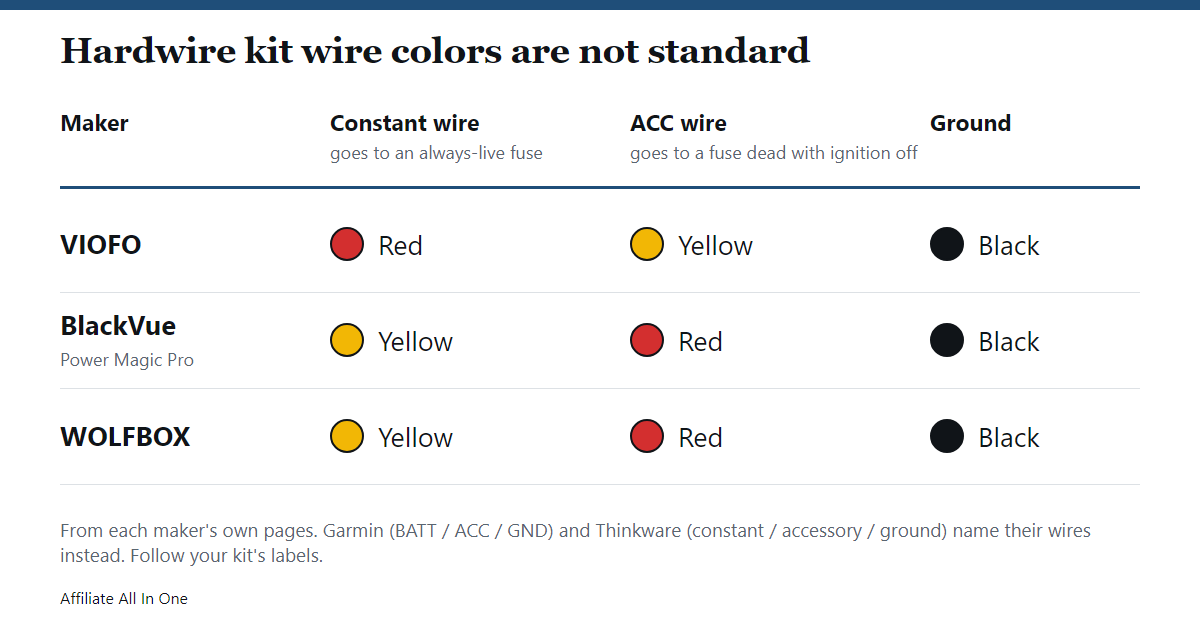
- Wire colors are not standard. The red wire is the constant wire on VIOFO kits and the ACC wire on BlackVue’s Power Magic Pro. Follow the labels on your own kit.
- Cutoff settings differ by maker. The values on the maker pages run from about 11.6 V to 12.5 V. A higher setting protects the car battery more and shortens the parking time.
- Test it before you rely on it. Several makers describe a check: a voice prompt, an icon, or a look at the voltage on the last parking clip.
Do you need a hardwire kit for parking mode?
A dash cam normally runs from the 12V socket, starts when the engine starts and stops when it stops. Parking mode asks the camera to keep watching after you leave, so it needs a supply that stays on. Nextbase says its Smart Parking feature only works if the camera has power while the car is parked, and Garmin says its Parking Guard needs either an always-on 12V cable or its parking mode cable accessory. Garmin also notes that the feature is not available in every region because of privacy rules, so check the rules where you live.
If you do not want parking mode, you do not need a kit. VIOFO says that if you installed one and then decide you do not want parking mode, you can turn that mode off in the menu or unplug the cable when you park. This table shows how the makers’ pages treat each way of powering a camera.
| Power source | Parking mode? | What the maker pages say |
|---|---|---|
| 12V socket cable | Not on Thinkware | Thinkware says the cable lacks an ACC wire, so the camera stays in normal mode even from an always-on socket, and that the camera must be unplugged by hand to avoid draining the battery. VIOFO warns that a socket which stays live still risks draining the battery. |
| Hardwire kit | Yes | Taps the fuse box. Includes a low-voltage cutoff and, on some kits, a timer. VIOFO notes that a car whose fuse box has no ACC fuse (one that loses power when the engine stops) cannot enter parking mode this way. |
| OBD power cable | Yes, on supported models | Thinkware lists it for hybrid, electric and stop-start cars and says to confirm that the OBD port keeps power with the ignition off. VIOFO says its own OBD cable supports parking mode and asks for its original cable to be used. |
| External battery pack | Yes | Thinkware and VIOFO both describe packs that charge while you drive and run the camera while parked. BlackVue says battery packs such as its B-124X are protected by internal circuitry, not by a voltage cutoff. |
| The camera’s own battery | On some models | Garmin has a “Run on Battery” setting for Parking Guard. It warns that touching the camera while this is on may wake it. |
What does a dash cam hardwire kit do?
A hardwire kit is a short cable that ends in a USB plug for the camera and in three wires for the car. VIOFO shows a 5V output at the camera end, and WOLFBOX lists a 12 V to 24 V input with a 5V, 4A output on its USB-C kit. The three wires are:
- Constant power: connected to a fuse that stays live with the ignition off. Garmin labels this wire BATT.
- Accessory (ACC) power: connected to a fuse that is dead when the ignition is off and live when it is on. When this wire loses power, the camera knows you have switched off and changes mode.
- Ground: connected to bare, unpainted metal, usually under an existing bolt or screw.
The kit also watches the battery. VIOFO and BlackVue both say the camera stops when either the cutoff voltage is reached or the timer runs out, whichever comes first. Parking mode only starts if the two power wires behave differently when the car is switched off. VIOFO says that swapping them, or putting both on constant fuses, stops parking mode from starting. Thinkware describes the same two faults: a constant wire that loses power turns the camera off, and an ACC wire that stays live leaves it in driving mode.
Which parking mode should you choose?
The makers use different names for what are really a few approaches. Here is how their pages describe them.
| Approach | What it does | Where the makers describe it |
|---|---|---|
| Motion or event detection | Records when it sees movement in front of the lens, stops when the scene is still | VIOFO “auto event detection” (three sensitivity levels, clips locked) and Thinkware “motion detection” |
| Impact only | Wakes on a bump and saves a clip | Nextbase Smart Parking saves a 30-second protected file and then up to 5 more minutes. Thinkware’s heat protection switches to impact-only clips of 20 seconds |
| Time-lapse | Records fewer frames a second, so playback is fast and silent, with lower power use | VIOFO, Thinkware (some models) and WOLFBOX (12 or 24 hours) |
| Low bitrate | Records constantly at lower image quality, with lower power use | VIOFO |
Three details from the pages are worth knowing before you choose. VIOFO says its buffered parking mode saves 15 or 5 seconds from before the trigger on most models, but not on the A129 Plus. VIOFO also says the parking G-sensor only works while the camera is recording, so in event-detection mode a bump will not be caught unless motion woke the camera first. And Thinkware warns that changing the parking mode setting erases the parking footage already recorded, so copy off anything you want first.
Garmin takes a slightly different route. Its Parking Guard settings let you pick how long the car must sit still before it starts, the impact sensitivity and the monitoring time, and a “Record Before Incident” option saves 15 seconds before an incident if the camera has external power. Thinkware also says that when the temperature inside the car passes 65 °C, supported cameras drop to impact-only recording until it falls to 55 °C. In our reading, none of the makers calls one approach best. Motion detection catches more, and time-lapse and low-bitrate modes use less power.
Whichever you pick, the camera is still writing to its microSD card. Our guide to choosing an SD card for a dash cam or security camera covers endurance cards and how to size one, and the speed class explainer covers the ratings printed on the card.
Does parking mode drain the car battery?
It uses the car battery, because that is where the power comes from. What the makers claim is that a correctly wired and correctly set camera stops before the battery is flat. Thinkware says that when wired and set up correctly its cameras should not cause battery drainage. VIOFO says there is no concern about drainage as long as the kit works normally. Both point to the wiring and the settings as the first things to check if the battery does go flat.
Nextbase gives the longest list of reasons the runtime varies. It says modern cars draw some power when parked whether or not a camera is fitted, and lists these factors:
- the size, age and health of the 12V battery;
- cold weather, which lowers battery performance;
- keyless entry and alarm systems that draw power;
- a high G-sensor sensitivity, which wakes the camera more often;
- hybrids, whose extra low-voltage systems may shorten the parking time;
Nextbase also says to unplug the camera if the car will sit for over a week while it is on permanent power. For a sense of scale, Thinkware says a hardwired camera will record in parking mode for about 8 hours, depending on the car’s battery level, before powering down. It says its iVolt Xtra battery pack can run a two-channel camera for 27 hours. That is one maker’s example, not a standard. In our reading, it suggests parking mode is measured in hours rather than days.
Electric and hybrid cars
The maker pages we read talk about the car’s 12V system. Thinkware lists its OBD cable as compatible with hybrid, electric and stop-start cars, and Nextbase’s 522GW support page lists an article on fitting a camera to an electric or hybrid car through a 12V port or a hardwire kit that includes a voltage cutoff. We found no maker figure for how much parking mode draws in a particular electric car, so check your car’s manual or ask the maker.
What cutoff voltage should you set?
The makers do not agree on one number, and their pages describe the trade-off in the same way: a lower cutoff gives longer recording and leaves less in the battery.
| Maker | Cutoff on the page | Other details |
|---|---|---|
| VIOFO | Four settings from 11.8 V (longest parking) to 12.4 V (safest); 23.6 V to 24.8 V for 24V systems | About 0.3 V tolerance. For a battery that drained, it suggests 12.4 V and a timer of about 2 hours. |
| BlackVue | 12.0 V to 12.5 V in 0.1 V steps on X-series cameras; 12 V or 12.5 V on the Power Magic Pro | Advises 12.2 V to 12.5 V in winter and not going below 12.0 V. Timer on the Power Magic Pro runs from 6 hours to unlimited. |
| Nextbase | Its kit cuts power at about 11.6 V and can be set higher | Suggests starting at 12.7 V and moving toward 12.5 V if needed. |
| WOLFBOX | 11.8 V, plus or minus 0.2 V | Its USB-C kit cuts power after 60 seconds below that level. |
| Thinkware | You choose the value in the app | Powers down after the voltage stays below it for more than 5 minutes. A winter option switches off 0.2 V earlier. A separate record timer also exists. |
The Garmin pages we read give no cutoff figure, only a monitoring time. Thinkware adds a warning that is easy to miss: if the car battery is already below your chosen value when the camera enters parking mode, the camera cannot act on the threshold and can drain the battery completely. A kit does not repair a weak battery.
How the numbers compare with a battery’s charge (our reading)
Battery University reproduces a Battery Council International table for a 12V starter battery, measured at 26 °C after a 24-hour rest with nothing connected:
| Approximate charge | Resting voltage |
|---|---|
| 100% | 12.65 V |
| 75% | 12.45 V |
| 50% | 12.24 V |
| 25% | 12.06 V |
| 0% | 11.89 V |
Our reading is that the low settings of 11.6 V to 11.8 V sit below the table’s 0% line, while 12.4 V and 12.5 V sit near its 75% line. We would not turn the table into a rule. Battery University says voltage is a rough guide to charge, that heat and cold shift the reading, and that a modern car’s background loads mean the battery is never fully at rest. A parked car’s voltage will not match the table exactly. The point is only that the highest settings leave far more in the battery than the lowest ones.
How do you hardwire a dash cam?
These steps combine the VIOFO, BlackVue, WOLFBOX, Garmin and Thinkware pages. Your kit’s manual comes first, and your car’s manual should say where the fuse box is and what each fuse does. Garmin warns that wiring the cable incorrectly can damage the car or the battery and cause injury, and it recommends an experienced installer. VIOFO and Thinkware also suggest a professional if you are not comfortable doing it.
- Find the fuse box and the fuse type. VIOFO says fuse boxes vary by car, model and year, and may sit by the glove box, in the trunk or under the hood. It names four common types (ATC, ATS, Micro2 and Mini) and says Mini is the most common. Buy fuse taps in the type your box uses.
- Switch the car off and take the key out.
- Find a constant fuse and an ACC fuse with a multimeter or test light. The constant fuse still shows power with the ignition off. The ACC fuse shows none with the ignition off and shows power when the ignition is on.
- Fit the taps. VIOFO says both slots of the tap must hold a fuse: the original for the car’s circuit and one for the camera. A tap with an empty slot will not pass power on.
- Crimp the kit’s wire to the tap and tug it to check it is firm.
- Connect the ground wire under an existing bolt or screw on bare metal.
- Plug the kit into the camera, start the car and check that the camera powers up. Then switch parking mode on in the menu, set the cutoff and switch the car off to see whether the camera changes mode.
Which fuses should you use?
This is where the makers’ pages differ most, so we are not giving a list. VIOFO gives examples: audio, power socket or power mirror for the ACC wire, and audio or hazard lights for the constant wire. It says fuses for airbags, stability control and the horn should be left alone, and that the car maker’s guidance comes first. WOLFBOX also advises against safety circuits and says to use a voltage tester together with the car’s fuse-box manual. BlackVue’s FAQ, meanwhile, names airbags among its examples of constant fuses.
Fuse labels also differ from one car to the next. In our reading, the lesson is that no list copied from a forum or a kit’s page will match your car. The safe method is the one all the makers describe: test with a meter, read the car’s own fuse chart, and avoid circuits connected to safety systems.
Nextbase adds one practical point about the constant wire. A permanent-live connection draws power with the car off, which parking mode needs, while a switched connection only draws power with the ignition on and suits normal use.
How do you check parking mode, and what if it is not working?
How can you tell parking mode is working?
- Listen and watch. Thinkware cameras announce “Parking recording will now start” after the ignition is switched off and stop responding to button presses. VIOFO says to expect a voice prompt or a parking icon on the screen, and a power light that flashes for a few seconds. WOLFBOX says its screen shows a time-lapse message after the car is turned off.
- Give it a bump. Nextbase suggests testing in a safe place by tapping the parked camera gently and checking that it saves a protected file.
- Do an overnight check. Thinkware says to let the camera record overnight, then look at the voltage printed in the corner of the last parking clip. It should be at or above your cutoff value.
Why is parking mode not working?
The camera turns off when the engine stops
Both VIOFO and Thinkware list the same causes. Parking mode may be switched off in the menu, or the constant wire may be losing power with the ignition. In that case the two power wires have probably been swapped, so check the labels on the kit’s cable.
The camera stays in driving mode
The ACC wire is on a fuse that does not go dead, or both power wires are on constant fuses. VIOFO and Thinkware both say to move the ACC wire to a fuse that loses power with the ignition. With an OBD cable, Thinkware says the switch can take up to 10 minutes, and that an OBD port which does not keep power with the ignition off will switch the camera off.
It stops recording earlier than expected
VIOFO says to check whether the car’s voltage has reached the cutoff or the timer has run out. If neither has, it suggests rechecking the connections and fuse taps, trying low-bitrate parking mode, and checking the card is on its recommended list.
The car battery went flat
VIOFO’s steps are to check the wiring, raise the cutoff to its highest setting with a timer of about 2 hours, switch parking mode off to see whether something else in the car is draining the battery, and replace the kit if it persists. Thinkware says to check that battery protection is switched on, confirm the camera is announcing parking mode, and use the overnight voltage check above.
What are the options without wiring to the fuse box?
OBD power cable
This plugs into the car’s diagnostic port. Thinkware describes its OBD cable as plug and play, and VIOFO says its own OBD cable supports parking mode. Thinkware cautions that some cars do not keep the port powered with the ignition off, so confirm with the car maker before buying.
External battery pack
Thinkware says its iVolt packs charge while you drive and run the camera while parked, so the camera does not draw from the car battery in parking mode. It describes them as an option for luxury cars or cars with a small battery. BlackVue says its own packs are protected by internal circuitry rather than a voltage cutoff, and that the Power Magic Pro should not be connected in series with a BlackVue battery pack.
The camera’s own battery
Some Garmin models can run Parking Guard on the camera’s internal battery when no external power is attached. It lasts less time than a kit or a pack, and Garmin notes the camera may wake if it is touched.
Does hardwiring void the car warranty, and what does it cost?
In a 2015 FTC business post, the agency said a company cannot void a warranty or deny coverage only because the owner used a part made by someone else or had someone other than the dealer do the work. The same post says a warranty claim can be refused if improper work caused the damage being claimed, and that the maker has to show that cause. In our reading, a kit that is wired correctly should not give a dealer grounds to refuse an unrelated claim, while a faulty installation that damages a covered part might. This is not legal advice, and the car’s own warranty booklet is the place to check.
We did not find a price for installation on any maker page, and we could not read a retailer’s installation price page, so we are not quoting one. The parts are the kit and the fuse taps. If you pay a shop to fit it, ask for a quote that covers both the camera and the wiring, and what happens if you want the kit moved to another car.
Frequently Asked Questions
Is hardwiring a dash cam necessary?
Only for parking mode or for neat wiring. The camera records fine while driving from the 12V socket, and VIOFO notes you can leave a kit’s parking mode off.
Can I hardwire a dash cam myself?
The makers describe it as a task you can do with a multimeter, a fuse tap and a ground point. Garmin warns that incorrect wiring can damage the car and recommends an experienced installer, and VIOFO suggests a shop if you cannot finish the steps.
Does a hardwired dash cam drain the car battery?
It draws from the battery in parking mode, but the kit’s cutoff is meant to stop it before the battery is flat. Thinkware and VIOFO say a correctly installed kit should not cause drainage. Nextbase says to unplug the camera if the car will sit for over a week.
How long can a dash cam stay in parking mode?
It depends on the car’s battery, the cutoff and timer, the weather and the mode. Thinkware’s example is about 8 hours on a hardwire kit, and 27 hours for a two-channel camera on its iVolt Xtra battery pack.
What is the best cutoff voltage for a dash cam?
No maker names a single best value. The pages we read run from about 11.6 V to 12.5 V, and BlackVue, VIOFO and Nextbase all say a higher setting protects the battery more, especially in cold weather.
Which fuse should I tap for a dash cam?
One that your meter shows is constant, for the constant wire, and one that goes dead with the ignition, for the ACC wire. The makers’ example lists differ, so use your car’s fuse chart and avoid safety circuits.
Is there a dash cam parking mode without hardwiring?
Yes. The makers describe an OBD cable, an external battery pack or, on some Garmin cameras, the camera’s own battery.
Does hardwiring a dash cam void the car warranty?
Not by itself, according to the FTC’s 2015 post on this point. A warranty claim can be refused if faulty work caused the damage.
Does parking mode work in an electric or hybrid car?
Thinkware lists its OBD cable for hybrid and electric cars, and Nextbase describes using a 12V port or a kit with a cutoff. Nextbase warns that a hybrid’s extra low-voltage systems may shorten the runtime. We found no maker figure for a particular electric car.
Do dash cams record when the car is off?
Only if the camera has constant power and parking mode is switched on. With a normal 12V cable on a switched socket, the camera turns off with the car.
Sources
All pages were checked on October 6, 2026. Pages without a publication date are listed without one.
- Garmin: Dash Cam Mini 2, Parking Guard
- Garmin: Dash Cam 46/56/66W, Connecting the Parking Mode Cable Accessory to Power
- Garmin: Dash Cam 47/57/67W, Parking Guard Settings
- VIOFO Support: What Cut-off Protection Voltage To Choose for Hardwire Kit? (modified May 17, 2023)
- VIOFO Support: How to Install the Hardwire Kit? (modified May 21, 2026)
- VIOFO Support: Can I turn on/off Parking Mode with a button? How Does Parking Mode Work? (modified June 25, 2023)
- VIOFO Support: Why isn’t parking mode working? (modified May 21, 2026)
- VIOFO Support: Do Dashcams record when you’re parked? (modified June 9, 2023)
- VIOFO Support: What is Auto-Event Detection? What Parking Mode to Choose? (modified June 11, 2023)
- VIOFO Support: Advanced Buffered Parking Mode (modified April 23, 2023)
- VIOFO Support: Is it possible to use the OBD charger? (modified May 11, 2026)
- VIOFO: How To Install The Hardwire Kit, A Step-by-Step Guide
- BlackVue Help Center: Power Magic Pro (PMP)
- BlackVue Help Center: Battery Protection Features, Low Voltage Cutoff
- Thinkware Help Center: Powering your Thinkware Dash Cam
- Thinkware Help Center: Vehicle Battery Drainage
- Thinkware Help Center: Battery Protection (Voltage Cut Off)
- Thinkware Help Center: Not going into Parking Mode
- Thinkware Help Center: Smart Parking Recording
- Thinkware Help Center: Enabling Parking Mode
- Thinkware Help Center: How to Install the iVolt Xtra Battery Pack
- Nextbase Support: What Is Smart Parking?
- Nextbase: 522GW Dash Cam Support
- WOLFBOX: Hardwire Kit FAQs
- WOLFBOX: Dash Cam Hardwire Kit for G900Pro
- Federal Trade Commission: FTC to BMW, Don’t MINImize Mag-Moss warranty compliance (March 2015)
- Battery University: BU-903, How to Measure State-of-charge
Spotted something out of date? See our corrections policy, or browse more Electronics guides.
Sources and last update
This article is written from official and primary sources, such as government agencies, standards bodies and manufacturer documentation, and is checked against them when it is updated. It is based on research, not hands-on testing. See how we research and our editorial policy.
Last updated: October 17, 2026