How this guide was written: It was researched with AI assistance from the Epson user’s guides for the Home Cinema 3200/3800 and the EpiqVision Ultra LS800, Optoma’s spec sheet for its BX-CTA16 lens, BenQ’s throw ratio and short throw pages, RTINGS’s throw distance guide, the ProAV lens shift page, a Projector Reviews article on lens shift, Just Projectors’ blog and FAQ pages, and an EduTech Wiki page on ultra short throw, all listed under Sources, and checked against them on October 9, 2026. We did not test or measure any projector. The distance tables are our own arithmetic, labeled as such. This guide has no affiliate links. Epson, BenQ, Optoma and Just Projectors sell projectors or lenses, and RTINGS says it may earn commissions from retailer links, so their pages reflect their own interests. See how we research.
Short answer: Throw ratio compares how far the lens sits from the screen with how wide the picture is, as distance divided by width. To find how far back to put a projector, multiply its throw ratio by the image width, not the diagonal. For a 16:9 picture with a 100-inch diagonal the width is about 87 inches, so a ratio of 1.5 puts the lens about 131 inches, or almost 11 feet, from the screen. Many projectors list a range because of zoom, so the real answer is often a span of distances, and a short throw model gives you much less room to adjust.
Key takeaways
- Use width, not diagonal. RTINGS, BenQ and Just Projectors all define throw ratio with the image width. One older wiki page uses the diagonal instead, which on a 16:9 picture would overstate the distance by about 15% (our arithmetic).
- The formula runs both ways. Distance equals ratio times width. Width equals distance divided by ratio. Make sure both are in the same unit.
- A range means zoom. Epson’s guide for two home cinema models gives 116 to 188 inches for a 100-inch picture. That is a ratio of about 1.33 to 2.16 by our arithmetic, which matches the 1:1.62 zoom Epson lists.
- “Short throw” is a loose label. RTINGS says its groupings are broad categories, not standards. BenQ’s own pages draw the line at 100 inches from under 9 feet in one place and call 8.4 feet “standard throw” in another.
- Lens shift beats keystone. Epson’s guide says to use lens shift, not keystone correction, when the projector cannot sit centered, for better image quality.
- Short throw trades flexibility for space. A retailer’s guide says most short throw projectors have no zoom, need a very flat surface and can be less sharp in the corners. Epson’s ultra short throw guide warns that the image is very sensitive to small adjustments.
What is throw ratio?
Throw ratio ties together two measurements: the throw distance, which is how far the lens is from the screen surface, and the width of the image it makes. RTINGS and BenQ both describe it as distance divided by width. BenQ’s example is a ratio of 2.0, meaning the projector needs 2 feet of distance for every 1 foot of image width. A lower number means a bigger picture from closer in.
The detail that trips people up is that the width is not the size you shop by. Screens are sold by diagonal, and RTINGS notes that a 16:9 picture with a 100-inch diagonal measures only about 87.2 inches across. Just Projectors says the ratio is always based on width, never on diagonal or height. The width of a 100-inch diagonal changes with the shape of the picture:
| Aspect ratio | Width of a 100-inch diagonal | Height |
|---|---|---|
| 16:9 | 87.2 inches | 49.0 inches |
| 16:10 | 84.8 inches | 53.0 inches |
| 4:3 | 80.0 inches | 60.0 inches |
| 2.35:1 (wide cinema) | 92.0 inches | 39.2 inches |
This table is our own arithmetic. It matters because a wider shape means a wider picture, and so a longer distance for the same ratio. RTINGS makes a related point: a wall’s width is often the limit before the room’s depth is.
One source disagrees on the definition. An EduTech Wiki page on ultra short throw projectors defines the ratio using the diagonal and works its example that way. That page is marked as incomplete and dates from 2017 to 2018, and the other sources we read use width, so we treat width as the standard reading. The safe habit is to check how a maker’s spec sheet or calculator states it.
How do you calculate how far back to place a projector?
Take the width of the picture you want, then multiply by the throw ratio on the spec sheet. Going the other way, divide the distance you have by the ratio to find the largest width it can make. Just Projectors walks through this with an Epson model that lists “1.3 to 1.56:1”: for a picture 2 meters wide, the projector goes between 2.6 and 3.12 meters back. For a fixed distance of 3 meters, the width can be zoomed between about 1.92 and 2.3 meters.
Here is the same arithmetic for a 16:9 picture across common sizes and ratios. These are our own calculations, measured from the lens to the screen, and they match RTINGS’s own reference table at the ratios it uses (0.25, 0.5 and 1.0) for the sizes we share with it (100, 120 and 150 inches).
| Throw ratio | 80-inch | 100-inch | 120-inch | 150-inch |
|---|---|---|---|---|
| 0.25 (ultra short) | 1.5 ft (0.44 m) | 1.8 ft (0.55 m) | 2.2 ft (0.66 m) | 2.7 ft (0.83 m) |
| 0.5 (short) | 2.9 ft (0.89 m) | 3.6 ft (1.11 m) | 4.4 ft (1.33 m) | 5.4 ft (1.66 m) |
| 1.0 | 5.8 ft (1.77 m) | 7.3 ft (2.21 m) | 8.7 ft (2.66 m) | 10.9 ft (3.32 m) |
| 1.5 | 8.7 ft (2.66 m) | 10.9 ft (3.32 m) | 13.1 ft (3.98 m) | 16.3 ft (4.98 m) |
| 2.0 | 11.6 ft (3.54 m) | 14.5 ft (4.43 m) | 17.4 ft (5.31 m) | 21.8 ft (6.64 m) |
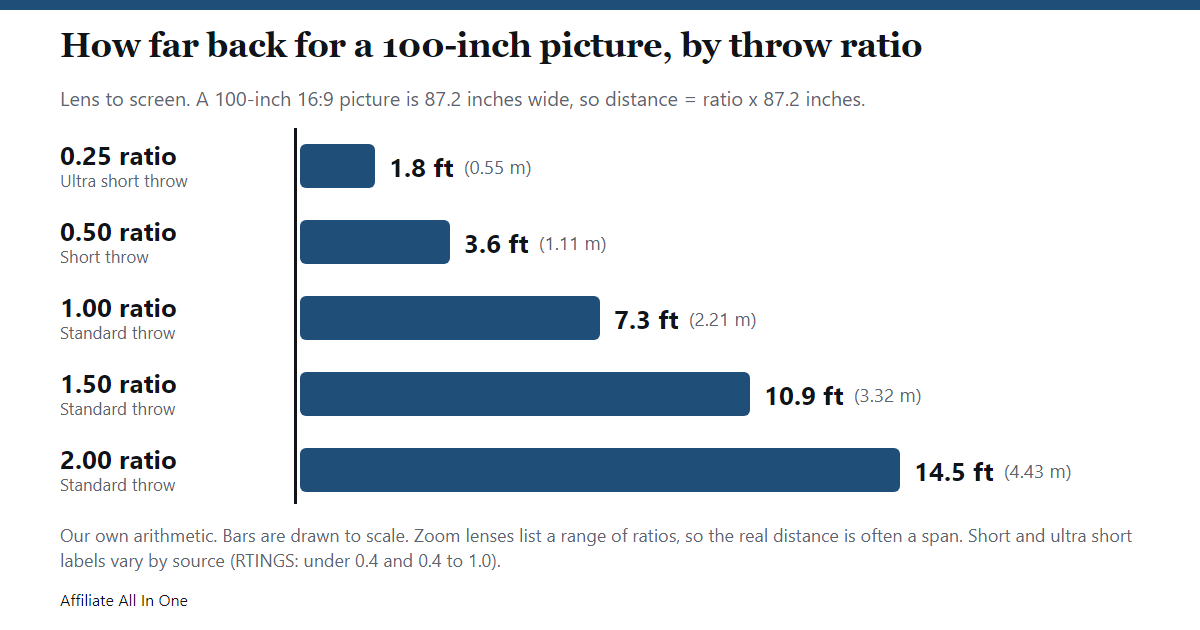
To use the formula the other way, say you have 10 feet, which is 120 inches, between the projector spot and the wall. By our arithmetic, a ratio of 1.5 makes a picture 80 inches wide, about a 92-inch diagonal in 16:9. A ratio of 1.0 would make one 120 inches wide, about a 138-inch diagonal.
Why do projectors list a range, and how does zoom change it?
Many projectors have a zoom lens, so they cover a span of distances. RTINGS explains that the wide end of the zoom gives the biggest picture for a given distance and the tele end the smallest, which is why spec sheets often show a minimum and maximum ratio. BenQ adds that some lens specs show one ratio without zoom and a separate pair of values for the zoom limits.
A real example is Epson’s user’s guide for the Home Cinema 3200 and 3800. It lists the distance for each picture size from the wide to the tele setting. Checking it against the formula, we divided each distance by the width of a 16:9 picture of that size:
| Picture size (16:9) | Epson’s distance, wide to tele | Implied throw ratio (our arithmetic) |
|---|---|---|
| 80 inches | 93 to 150 inches | 1.33 to 2.15 |
| 100 inches | 116 to 188 inches | 1.33 to 2.16 |
| 120 inches | 139 to 226 inches | 1.33 to 2.16 |
| 150 inches | 175 to 283 inches | 1.34 to 2.16 |
The ratio is steady across sizes, as it should be, and the spread of about 1.6 times matches the 1:1.62 zoom ratio in Epson’s specifications. At 100 inches the projector can sit anywhere from about 9.7 to 15.7 feet back. Epson also notes that the figures are rounded and that the real size can vary with the zoom factor and the aspect ratio.
Zoom is useful if you may move the projector, but both BenQ and RTINGS suggest that for a fixed mount you pick a projector that fits your room without leaning on the extreme ends of the range. RTINGS also separates optical zoom, which changes the picture size through the lens, from digital zoom, which shrinks or crops the picture electronically and should be seen as a convenience, not as placement flexibility.
What counts as short throw or ultra short throw?
RTINGS groups projectors by throw ratio: under 0.4 is ultra short throw, 0.4 to 1.0 is short throw, and 1.0 and up is standard throw. It adds that these are broad placement categories, not universal standards. Other makers define it by distance instead, and the two ways do not line up.
| Source | How it draws the line | What that means for a 100-inch 16:9 picture (our arithmetic) |
|---|---|---|
| RTINGS | Ultra short below 0.4, short 0.4 to 1.0, standard 1.0 and up. | Ultra short is under about 2.9 feet. Short is about 2.9 to 7.3 feet. |
| BenQ (short throw page) | Short throw if it can show 100 inches from under 9 feet (3 meters), regular throw if it needs more. | 9 feet is a ratio of about 1.24, above RTINGS’s limit of 1.0. |
| BenQ (throw ratio page) | Lists a model needing 8.4 feet for 100 inches as a “standard throw projector”, and one needing 6.5 feet as “short throw”. | Under BenQ’s own 9-foot rule on the other page, the 8.4-foot model would count as short throw. |
Practically, a ratio on the spec sheet is more useful than the label. A “short throw” in one catalog may need nearly twice the distance of one in another.
The trade-offs come mostly from a retailer, Just Projectors, so they are one seller’s view. Most short throw models have a single ratio and no zoom, so being off by a few centimeters can affect the picture. Focus can be less even, with the corners a little softer than the middle, which shows up more on text than on film. They need a very flat surface, and a rolled or folded screen can look wavy. They often cost a bit more, and Just Projectors says that if your install distance is flexible, a standard throw projector gives more choice and often saves money. It also says a short throw projector is not necessarily brighter, because brightness is measured at the screen by the maker and has nothing to do with the throw.
Where short throw helps, per the same page and RTINGS: small rooms, a ceiling mount that has to avoid a fan or light fitting, and fewer people walking through the beam. BenQ makes a similar point about people walking in front of the lens.
How close does an ultra short throw projector sit?
RTINGS says these models are built to sit only a few inches from the wall, in a setup that replaces a TV. At a ratio of 0.25, our arithmetic gives about 22 inches from the lens to a 100-inch picture, which matches RTINGS’s table of 1 foot 10 inches.
A real spec sheet may measure from somewhere other than the lens. Epson’s guide for the EpiqVision Ultra LS800 lists the distance from the image to the rear of the projector: 3.9 inches for a 100-inch 16:9 picture and 6.8 inches for 120 inches. It also lists how far the picture sits above the projector. For 100 inches, the bottom of the image is 5.9 inches above the top of the projector and the top of the image is 54.9 inches above it. Compare like with like when you plan a console or shelf.
Optoma’s spec sheet for a 0.36:1 ultra short throw lens, made for several of its laser projectors, lists a minimum throw distance of 0.96 and a minimum screen size of 120 inches, without stating a unit for the distance. Our arithmetic gives 0.96 meters for a 120-inch 16:9 picture at 0.36, so meters look right, and the UK sheet’s wording about “less than 3 metres” points the same way. The sheet also lists a fixed zoom and an offset of 142%, which it does not explain.
Epson’s LS800 guide warns that, because the throw is so short, even a small adjustment changes the shape and position of the picture a lot, so change one thing a little at a time. It also says a bowed image can mean the surface is not flat, and that this cannot be fixed from the projector’s settings.
What are lens shift, offset and keystone correction?
Throw ratio sets how big the picture is. Where it lands on the wall is a separate question, and three terms matter.
- Offset is where the picture lands relative to the lens by design. Projector Reviews says every projector has some fixed lens shift, because otherwise the lens would have to sit level with the middle of the screen, which is not practical. A spec sheet may list it as a percentage, as Optoma’s does.
- Lens shift is a physical adjustment that moves the lens, and with it the picture, up, down, left or right. ProAV says the available vertical and horizontal ranges depend on each other, and RTINGS says you generally cannot use the maximum of both at once. Just Projectors says lens shift is typically found on some mid-range and high-end home theater and business projectors and is rare on portable or budget ones.
- Keystone correction is digital. According to ProAV, the projector’s scaler resizes the image so it looks square again. Its downsides, as ProAV lists them, are leftover light in the blanked corners in a dark room, lost pixels on the squeezed side, and straight lines that turn step-like because of the scaling.
Both Epson guides we read lean the same way. The home cinema guide says to aim the projector straight at the middle of the screen and, when that is not possible, to move the picture with lens shift rather than keystone, which gives a better image. The LS800 guide also says the projector should face the screen straight on.
The Projector Reviews article, an older piece that refers to long-discontinued models, adds a nuance: even optical lens shift is not perfect. The author says it can produce a slight bowing, with the top center of a 100-inch image possibly roughly an inch below the top corners, which a screen border usually hides. Digital keystone, by contrast, degrades the picture line by line, the author says. The advice is to get the height right if you can, use lens shift if you have it, and otherwise try to place the projector so little or no keystone is needed.
Makers also describe shift differently. ProAV notes that some call the lens at the top or bottom edge of the image 100% and others call the same position 50%, so compare the numbers in inches or centimeters when you can. Epson’s guide for the Home Cinema 3200 and 3800 does give inches: for a 100-inch 16:9 picture, the distance from the lens center to the bottom of the image ranges from 4.9 to 53.9 inches depending on where the lens is shifted. That spread is 49 inches, which is exactly the height of that picture, so by our arithmetic the vertical range there is about one full picture height. The sideways shift is 20.9 inches each way at 100 inches, about 24% of the 87.2-inch width.
Can you ceiling mount a projector, and what changes?
Epson’s home cinema guide shows front, rear, front-ceiling and rear-ceiling set-ups and tells you to choose the matching Projection setting in the menu if you mount it on the ceiling or project from behind the screen. The LS800 guide puts no vertical or horizontal limit on how that projector may be installed, but it also says a ceiling mount is required to suspend it, the projector’s feet must be removed, and ceiling installation needs special expertise. We read that for one ultra short throw model, so check your own manual before you assume the same for another.
Where the projector sits relative to the picture matters. Projector Reviews says that on a table the lens should sit about level with the screen’s bottom edge or a little below it, and on an upside-down ceiling mount about level with the screen’s top edge or a little above it, unless the projector has enough lens shift to cover the difference. Your manual’s offset figures will tell you the real positions for your model.
A checklist before you buy or drill
This is our own summary of what the sources suggest, not a maker’s procedure.
- Start with the wall. RTINGS suggests beginning with the depth you have and the wall width you can give the picture, then choosing the size, not the other way round. Allow for any frame, speakers and furniture.
- Convert to width. Use the table above or the aspect ratio’s width for your diagonal.
- Compare with the spec sheet’s range. Both ends of the distance range should include your spot, ideally with some room at each end for a fixed install.
- Check lens shift and offset. Look at where the lens will sit relative to the picture, and how far it can move, in the maker’s own table.
- Check what the distance measures. Lens to screen, or the back of the cabinet to the wall, are different numbers.
- Confirm mounting rules. If it goes on the ceiling, check the manual says that is supported and what hardware is needed.
Where to sit is a separate question. RTINGS covers it in a different guide, and we have not covered it here.
Frequently Asked Questions
What is throw ratio on a projector?
How far the lens is from the screen, divided by how wide the picture is. A ratio of 1.5 means 1.5 feet of distance for each foot of picture width. Lower numbers mean a bigger picture from closer in.
How do you calculate projector throw distance?
Multiply the throw ratio by the picture width. For a 100-inch 16:9 picture the width is about 87.2 inches, so a ratio of 1.2 gives about 104.6 inches. RTINGS uses this same example. If the spec lists a range, calculate both ends to get the minimum and maximum distances.
How far should a projector be from a 100-inch screen?
It depends on the model. By our arithmetic, a ratio of 1.0 means about 7.3 feet and 1.5 means about 10.9 feet. For one real example, Epson’s guide for the Home Cinema 3200 and 3800 lists 116 to 188 inches, about 9.7 to 15.7 feet. Look up your projector’s own range.
How far should a projector be from a 120-inch screen?
Our arithmetic gives about 8.7 feet at a ratio of 1.0 and 13.1 feet at 1.5, for a 16:9 picture. Epson’s guide for the same two home cinema models lists 139 to 226 inches, about 11.6 to 18.8 feet. A short throw model at 0.5 would need about 4.4 feet.
How far does a short throw projector need to be from the screen?
By RTINGS’s grouping of 0.4 to 1.0, a 100-inch 16:9 picture needs roughly 2.9 to 7.3 feet. BenQ calls a projector short throw if it can make 100 inches from under 9 feet. Since the cut-offs differ, rely on the ratio on the spec sheet.
How far from the wall does an ultra short throw projector sit?
RTINGS says just inches. At 0.25, about 22 inches from lens to screen for 100 inches by our arithmetic. Epson’s LS800 guide lists 3.9 inches from the image to the rear of the projector at 100 inches and 6.8 inches at 120 inches, so check which point a spec measures from.
Can you mount an ultra short throw projector on the ceiling?
Epson’s LS800 guide says that model has no vertical or horizontal installation limit, but needs a ceiling mount, with the feet removed, and specialist installation. That is one model, so check the manual for yours.
Is lens shift better than keystone correction?
For image quality, the sources we read say yes. Lens shift moves the picture optically. Keystone, per ProAV, resizes the image digitally and loses pixels. Epson’s guide says to use lens shift instead of keystone when the projector cannot be centered.
Can you rely on zoom for a fixed installation?
BenQ and RTINGS both suggest choosing a projector that fits the room without depending on the ends of its zoom range. RTINGS also says digital zoom crops or shrinks the picture, so it is not the same as optical zoom.
Is a short throw projector brighter?
Not necessarily, according to Just Projectors. Brightness is measured at the screen by the maker, and a long throw model at a similar price may be brighter. Check the ANSI lumens on the spec sheet instead of assuming.
Sources
All pages were checked on October 9, 2026. Pages without a publication date are listed without one.
- Epson: Home Cinema 3200/3800 User’s Guide (projection distance, lens shift and specifications)
- Epson: LS800BATV/LS800WATV User’s Guide (placement and projection distance)
- Optoma US: BX-CTA16 ultra short throw lens spec sheet
- Optoma UK: BX-CTA16 ultra short throw lens spec sheet
- BenQ US: What is a Good Throw Ratio and Why Does it Matter?
- BenQ UK: What are Short Throw Projectors and What Makes Them Better for Gaming?
- RTINGS: Projector Throw Distance Calculator, How Throw Ratio, Screen Size, and Brightness Affect Your Setup (updated April 2, 2026)
- ProAV: Lens Shift and Keystone Correction
- Projector Reviews: The Advantages of Variable Lens Shift, in Placing Your Home Theater Projector
- Just Projectors: Short Throw vs Long Throw Projectors
- Just Projectors: What is Lens Shift?
- EduTech Wiki: Ultra short throw projector (last modified July 17, 2018)
Spotted something out of date? See our corrections policy, or browse more Electronics guides.
Sources and last update
This article is written from official and primary sources, such as government agencies, standards bodies and manufacturer documentation, and is checked against them when it is updated. It is based on research, not hands-on testing. See how we research and our editorial policy.
Last updated: October 20, 2026