How this guide was written: It was researched with AI assistance from Lawrence Berkeley National Laboratory, the U.S. Energy Information Administration (EIA), Virginia Cooperative Extension, the Federal Trade Commission, P3 International (maker of the Kill A Watt meter), TP-Link and a 2023 journal study on smart plugs, all listed under Sources, and checked against them on October 6, 2026. We did not test any meter, smart plug or appliance, and every cost example uses made-up loads, not measurements. This guide has no affiliate links. See how we research.
Short answer: To find what a device uses, plug it into a watt meter or an energy-monitoring smart plug and read the watts while it runs. Multiply watts by hours of use and divide by 1,000 to get kilowatt-hours, then multiply by your electricity price. A label is a rating, not your actual use. Plug-in meters only handle standard 120-volt outlets, and smart plugs can misread loads that change quickly.
Key takeaways
- Watts are a rate and kilowatt-hours are an amount. Berkeley Lab compares watts to speed and kWh to distance. Your bill charges for kWh.
- The formula is short. Watts × hours ÷ 1,000 = kWh, and kWh × price per kWh = cost. The EIA put the 2024 U.S. average residential price at 16.5 cents per kWh.
- Measure, do not trust the label. Virginia Cooperative Extension notes that actual use depends on the setting, and that a refrigerator runs at its full wattage only part of the time.
- Standby adds up. Berkeley Lab says standby is typically 5 to 10 percent of home electricity, and that meter errors grow when a load is below about 1 watt.
- Smart plugs are not all precise. A 2023 study of five brands found energy errors of 54 to 100 percent on four of them when the load changed quickly.
What are you measuring: watts, kWh and dollars?
Berkeley Lab explains the difference with an analogy. Watts measure power, like miles per hour. To get energy, like miles traveled, you convert power over time. The standard unit of energy is the kilowatt-hour (kWh), and it is what the utility meter counts and what your bill charges for.
Virginia Cooperative Extension gives the formula in one line: wattage × hours used per day ÷ 1,000 gives daily kWh. Multiply by the days of use for the yearly total, then by your utility’s price per kWh for the cost. As a check, Berkeley Lab says that one watt drawn all year equals about 9 kWh, which it priced at roughly $1.20 at 13 cents per kWh. If you are sizing a power station, solar generator or power bank, the same watt-hour math appears in our guides to power stations and generators, sizing a solar generator and power banks on planes.
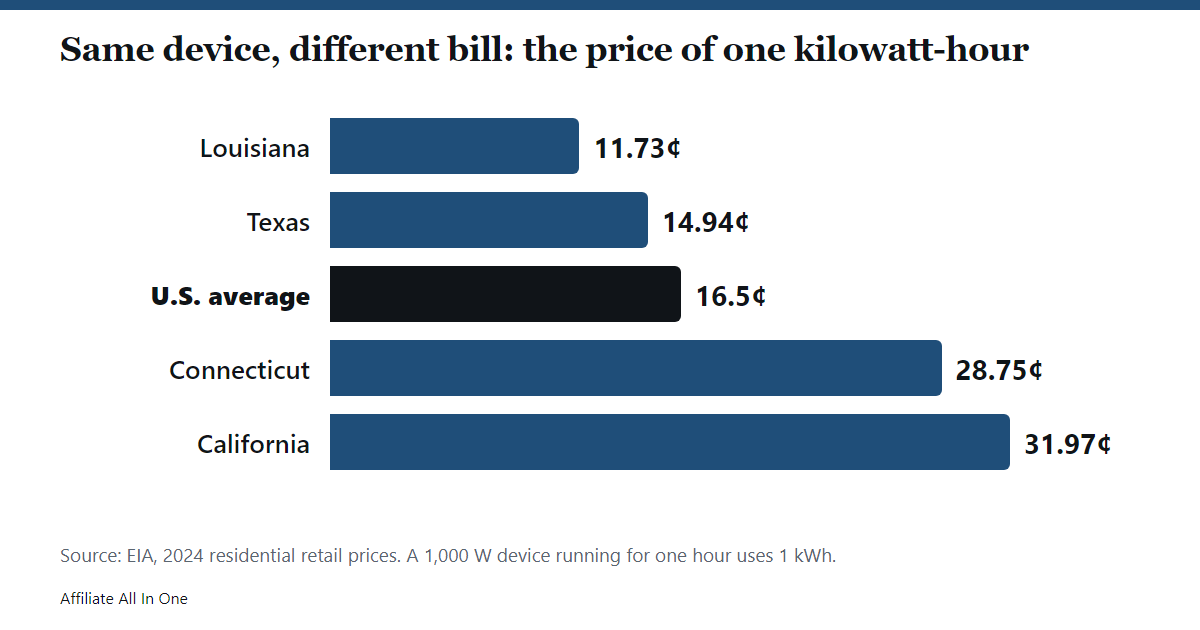
The price matters as much as the watts. The EIA reports that the average U.S. residential price rose from 16.0 cents per kWh in 2023 to 16.5 cents in 2024, and that the average residential customer used about 865 kWh a month in 2024. Its state table for 2024 shows how far the price moves:
| 2024 residential price | Cents per kWh |
|---|---|
| Louisiana | 11.73 |
| Washington | 11.90 |
| Texas | 14.94 |
| U.S. average | 16.5 |
| Connecticut | 28.75 |
| California | 31.97 |
If you want to compare appliances before you buy, the FTC says the yellow EnergyGuide label gives an estimated yearly energy use and cost. The estimate assumes typical use and the nationwide average energy price, so it will not match your bill exactly.
What does a device’s label tell you?
Virginia Cooperative Extension says the wattage of most appliances is stamped on the bottom, the back or a nameplate, and that it shows the power the appliance draws. It adds that many appliances have settings, so the actual draw depends on which one you use. Its refrigerator example shows why: a refrigerator is on all the time but cycles, and it estimates the time at full wattage as about a third of the time plugged in. It also says a motor can draw about three times its running current while starting.
In our reading, the label is the ceiling, not the average. Use it to estimate the worst case, and measure to find the typical case.
If there is no wattage on the label, Virginia Cooperative Extension says to multiply the amps by the volts, using 120 volts for most U.S. appliances and 240 volts for larger ones such as dryers and cooktops. The Kill A Watt manual adds a caution for that shortcut. It shows watts (real power) and VA (apparent power, volts × amps) as two separate readings and defines the power factor as watts divided by VA. In our reading, volts × amps from a clamp meter gives you VA, which can be higher than the watts you are billed for.
Which tool should you use to measure power?
| Tool | What the sources say | Good for |
|---|---|---|
| Plug-in watt meter | The Kill A Watt P4400 shows volts, amps, watts, VA, frequency and power factor, and counts kWh and elapsed time. It is rated for 115 volts (125 volts maximum), 15 amps and 1,875 VA. The maker claims 0.2 percent accuracy. | One device on a standard outlet |
| Smart plug with energy monitoring | TP-Link says its Tapo P115 monitors the energy that connected devices use and lets you enter your electricity rate to estimate bills. It lists a maximum load of 15 amps and 1,800 watts of resistive load. | Long-term logging of one device in an app |
| Clamp ammeter | Virginia Cooperative Extension describes it as a tool sold for electrical work that clamps onto one of the appliance’s wires and reads the current while the device runs. It asks you to follow the maker’s safety directions. | Amps only, for people who know how to use one safely |
| Utility meter and bill | Your bill shows the kWh used and the price per kWh. The EIA says monthly bills are the product of those two factors. | The whole house, not one device |
We did not review whole-home energy monitors, because the sources we read do not cover them, so we make no claims about them.
The Berkeley Lab FAQ says plug-in meters can be bought online for under $50 and that some libraries lend them. It says the simplest ones plug into an outlet and your device plugs into them. That matches the Kill A Watt instructions below.
How do you measure a device with a plug-in watt meter?
- Plug the meter into the wall outlet and the device into the meter. The Kill A Watt starts counting kWh and time as soon as power is applied.
- Press the Watt/VA key. The first press shows watts, the active power, and the next press shows VA, the apparent power.
- Check the power factor. The Hz/PF key shows frequency first and power factor on the next press.
- Run the device the way you normally use it. A device with settings, such as a fan or a heater, will read differently on each one, so test the setting you use most.
- Read the kWh and time. The KWH/Hour key shows the energy used since power was applied, then the elapsed time. The kWh display starts at 0.01.
- Reset by removing power. The manual says to take the meter out of the outlet for a moment to clear the counters.
Two practical points follow from the sources. A device that cycles, like a refrigerator, needs a long test, because a short one may catch only the running or only the idle part. The Kill A Watt manual says the counters read in 0.01 kWh steps, so in our arithmetic a 0.5 watt load takes 20 hours to move the display by one step. For tiny loads, leave the meter running overnight or longer.
How accurate are plug-in meters and smart plugs?
Berkeley Lab says most plug-in meters are reasonably accurate, and that the errors grow relatively larger when the load is below about 1 watt. The Kill A Watt datasheet claims 0.2 percent accuracy. That is a maker claim, and we found no independent test of it.
For smart plugs, there is a published warning. In June 2023, e-Prime published a study by Santos, Duggan, Davis and Zimmerle that tested plugs from five makers: Belkin, TP-Link, Etekcity, Emporia and Sonoff. They switched loads at rates from 0.01 to 2 times a second. The abstract reports these results:
- The Belkin plug’s largest energy error was 1.7 percent.
- The other four makers’ largest energy errors were 54 to 100 percent.
- Power readings were off whenever the load changed, even slowly, at rates as low as 0.01 to 0.05 times a second.
- Every plug reported its readings with a delay of 3 to 6 seconds, and some by up to 20 seconds.
The authors concluded that the errors call into question using these plugs for research on highly variable loads. We could only read the abstract, which does not report how the plugs did on steady loads, so we are not claiming either way. In our reading, a smart plug is a reasonable way to see roughly where your electricity goes, and a poor way to settle a precise number for something that switches on and off rapidly, such as a computer under changing load. Check anything important with a second meter.
What is standby power, and how do you find it?
Berkeley Lab defines standby power as the electricity a device uses when it is switched off or not doing its main job. It says nearly every product that has a plug-in power adapter, a battery, a remote control, an always-on display (an LED counts) or a network connection keeps drawing power, even when idle, and that sometimes you need a meter to be sure. It also gives reasons standby exists, such as converting AC to DC in a wall adapter, listening for a remote, keeping a clock and charging a battery.
The Laboratory says typical standby use is 5 to 10 percent of home electricity in most developed countries, and that each device uses little but the total across 40 or more products is significant. It adds that limited research suggests an informed and determined effort can cut standby use by about 20 percent.
To measure it, follow these steps with a plug-in meter:
- Plug the device in and switch it off the normal way, or leave it in its sleep state.
- Let it settle for a few minutes, then read the watts.
- If the reading is near or below 1 watt, treat it as approximate, because Berkeley Lab says the errors are relatively larger there. Use the kWh counter over a long period for a steadier figure.
The Laboratory’s “What Can I Unplug Now?” list names unused video recorders, old boom boxes, empty battery chargers, rarely used audio equipment, a guest-room TV with its set-top box and sound bar, and a UPS connected to nothing. It also suggests sleep mode for computers and a switchable power strip for a cluster of devices. It says to think before you unplug and not to unplug devices with worn cords.
What does a device cost to run? Worked examples
These use made-up loads to show the arithmetic. They are our own calculations, not measurements, and they use the EIA’s 2024 residential prices from the table above.
| Example | kWh | Louisiana (11.73¢) | U.S. average (16.5¢) | California (31.97¢) |
|---|---|---|---|---|
| 100 W TV, 4 hours a day for a year | 146 | $17.13 | $24.09 | $46.68 |
| 5 W standby, 24 hours a day for a year | 43.8 | $5.14 | $7.23 | $14.00 |
| 1,000 W heater for 1 hour | 1 | $0.12 | $0.17 | $0.32 |
| 1,000 W heater, 3 hours a day for 30 days | 90 | $10.56 | $14.85 | $28.77 |
The Berkeley Lab rule gives the same picture for the standby row. A 5 watt device is about 45 kWh a year on its rule of 9 kWh per watt, close to our 43.8, because one watt for a year is exactly 8.76 kWh. For comparison with whole-home use, the EIA says the average residential customer bought 10,791 kWh in 2022, so the 5 watt standby load is well under one percent of that.
What can a plug-in meter not measure?
A standard plug-in meter is built for ordinary outlets. The Kill A Watt P4400 is rated for 115 volts (125 volts maximum) and 15 amps, and its manual warns not to exceed the maximum ratings on its label. Virginia Cooperative Extension says bigger appliances, like dryers and electric cooktops, run on 240 volts. In our reading, this means a plug-in meter rated for 120 volts is not the tool for a dryer or an electric cooktop.
Smart plugs have the same limits. TP-Link lists its Tapo P115 for 100 to 125 volts and a 1,800 watt resistive load. Before you meter a heater or an air compressor, check that its rated load is within the meter’s rating. For 240-volt appliances, ask an electrician rather than opening a panel or wiring a meter yourself.
Which appliances use the most electricity?
The EIA says the biggest yearly electricity uses in homes are heating and cooling, that the amounts vary with the weather, and that its Residential Energy Consumption Survey consistently shows air conditioning as the largest single use. A plug-in meter will not show you those directly. It is better at finding the smaller loads you can change: an old device that is always on, a forgotten charger or an extra TV. Berkeley Lab’s point is that one device may cost a few dollars a year but 40 of them do not.
Frequently Asked Questions
How do I convert watts to kWh?
Multiply the watts by the hours of use and divide by 1,000. A 100 watt device running 10 hours uses 1 kWh.
Is 1,000 watts the same as 1 kWh?
No. Watts measure power at a moment, and kWh measure energy over time. A 1,000 watt device uses 1 kWh in one hour.
How much does 1,000 watts cost per hour?
One kWh. At the EIA’s 2024 U.S. average of 16.5 cents, that is about 17 cents. It was about 12 cents at Louisiana’s price and about 32 cents at California’s.
How accurate is a Kill A Watt?
The maker claims 0.2 percent accuracy for the P4400. We found no independent test. Berkeley Lab says most plug-in meters are reasonably accurate but errors grow when the load is under about 1 watt.
Does a Kill A Watt work on 220 or 240 volts?
No. The P4400 is rated for 115 volts (125 volts maximum) and 15 amps, so it is for standard outlets. Clothes dryers and cooktops use 240 volts according to Virginia Cooperative Extension.
Can a smart plug measure power consumption?
Some can. TP-Link says its Tapo P115 monitors the energy that connected devices use and lets you enter your electricity rate to estimate bills. A plug without that feature will not report energy.
How accurate are smart plugs?
It depends on the plug and the load. A 2023 study of five brands found large energy errors on four of them when loads changed quickly, and reporting delays of 3 to 6 seconds. It does not tell us how they perform on steady loads.
Do smart plugs use electricity themselves?
In our reading, probably a little, since Berkeley Lab says products with a network connection draw power continuously. The TP-Link pages we read give no figure, so measure it with a plug-in meter if it matters.
How much power does a device use when it is off?
It varies. Berkeley Lab says almost anything with an external power supply, battery, remote, display or network connection keeps drawing power, and that you need a meter to be sure. Across a home, it says standby is typically 5 to 10 percent of electricity.
Why does my meter show different watts than the label?
The label is a rating, and the meter shows what the device is using now. Settings, cycling and motor starting all change the draw. A clamp meter’s volts × amps can also read higher than watts because of power factor.
Sources
All pages were checked on October 6, 2026. Pages without a publication date are listed without one.
- Lawrence Berkeley National Laboratory: Frequently Asked Questions About Standby Power
- Lawrence Berkeley National Laboratory: What Can I Unplug Now?
- Virginia Cooperative Extension: ENERGY SERIES, Estimating Appliance and Home Electronic Energy Use (February 26, 2020)
- U.S. Energy Information Administration: Residential electric bills in Hawaii and Connecticut are twice those in New Mexico, Utah
- U.S. Energy Information Administration: 2024 Total Electric Industry, Average Retail Price (cents/kWh)
- U.S. Energy Information Administration: How much electricity does an American home use?
- U.S. Energy Information Administration: Electricity explained, Use of electricity
- Federal Trade Commission: How To Use the EnergyGuide Label To Shop for Home Appliances
- P3 International: P4400 Kill A Watt Operation Manual (copy hosted by Dover, NH library)
- P3 International: Kill A Watt P4400 datasheet
- TP-Link: Tapo P115 Mini Smart Wi-Fi Plug, Energy Monitoring
- Santos, Duggan, Davis and Zimmerle: A Cautionary Note on Using Smart Plugs for Research Data Acquisition, e-Prime (June 2023, abstract read)
Spotted something out of date? See our corrections policy, or browse more Electronics guides.
Price snapshot: prices, discounts, ratings and coupon codes in this article were recorded around October 2026 (when it was written) and may have changed. Sellers change them often, so check the current details on the seller’s own page before you buy. See our Corrections Policy if you spot an error.
Sources and last update
This article is written from official and primary sources, such as government agencies, standards bodies and manufacturer documentation, and is checked against them when it is updated. It is based on research, not hands-on testing. See how we research and our editorial policy.
Last updated: October 22, 2026