How this guide was written: It was researched with AI assistance from the SD Association, SanDisk, Samsung, Garmin, Nextbase, VIOFO, Reolink and Wyze pages listed under Sources, and checked against them on October 5, 2026. We did not test any card, dash cam or security camera. This guide has no affiliate links. See how we research.
Short answer: Dash cams and security cameras write to their microSD card all day and then overwrite it, so camera makers point to endurance-rated cards instead of ordinary phone cards. Check your camera’s manual for the card type, largest size and file system it accepts. Then pick a capacity by dividing the card size by the gigabytes your camera records per hour. For a dash cam, VIOFO calls 64 GB the minimum and 128 GB or 256 GB the safer choice.
Key takeaways
- The camera sets the rules. Garmin, VIOFO, Nextbase and Reolink each list a card type, a speed class and a file system for their cameras, and these differ from maker to maker.
- Endurance is a rating, not a promise. SanDisk and Samsung publish “up to” recording hours for their endurance cards, and the hours grow with the card’s capacity.
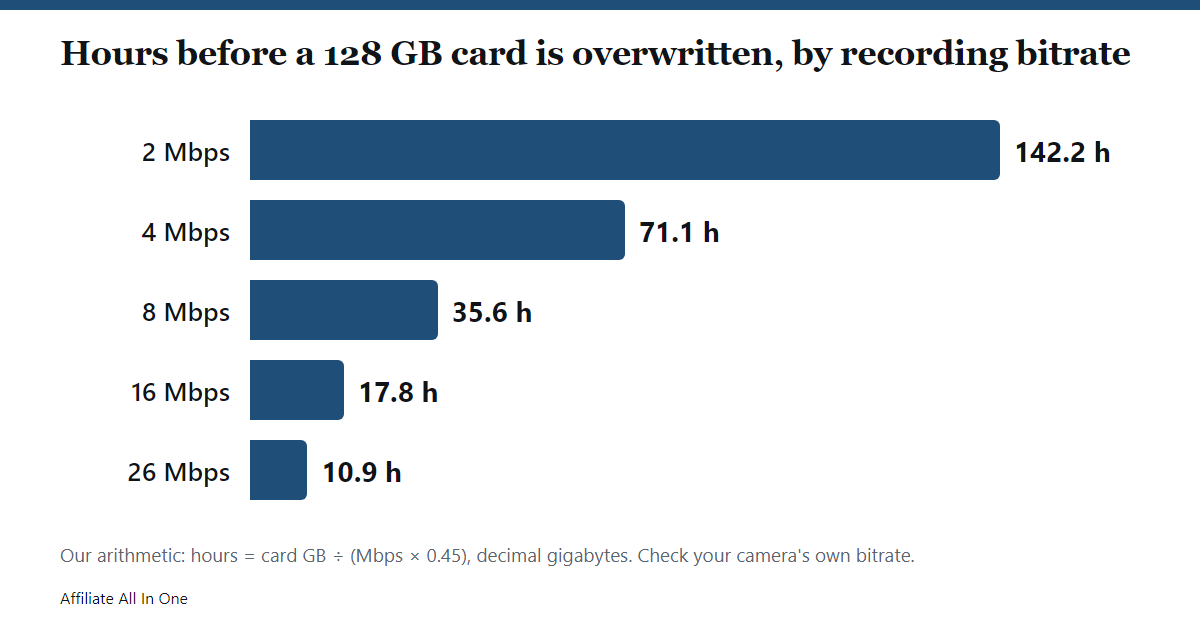
- Size depends on bitrate. Our arithmetic below shows the same 128 GB card holding about 11 hours or about 142 hours, depending on how much data the camera records each second.
- Format the card in the camera. Reolink, VIOFO, Nextbase, Garmin and Wyze all describe formatting in the device. The intervals they give range from every few weeks to once every six months.
- Card errors have a short list of causes. Wrong card type, wrong file system, a card that needs formatting, or a worn card. Maker pages cover the first three and give symptoms for the last.
Why cameras are hard on a memory card
A dash cam or a security camera set to continuous recording writes every second and, once the card is full, starts overwriting the oldest footage. Nextbase says this continuous recording and overwriting is why the card needs to be a high-endurance type, and that a card not made for it may seem fine at first and fail after days, weeks or months. VIOFO describes the same load as constant read and write cycles that wear out a low-endurance card.
The SD Association adds a second effect. Repeated deleting and writing fragments the card, and it says writing into fragmented space is generally slower than writing sequentially. It also says its Speed Class ratings assume sequential writes into free, unfragmented space, and that a card may need to be reformatted when the host cannot record at the rated speed. Both points are why makers ask for regular formatting, covered below.
The card’s temperature range is on its specification sheet. Samsung lists an operating range of -25 °C to 85 °C for its PRO Endurance card and SanDisk lists -13 °F to 185 °F for its endurance cards, while Reolink lists 0 °C to 70 °C for its own cards. Compare the range on a card’s specification sheet with the place the camera sits.
What is a high endurance microSD card?
“Endurance” is a marketing label, not an SD Association class. SanDisk and Samsung use it for cards they rate in hours of continuous recording. These are the maker ratings, which are “up to” figures:
| Card (maker rating) | 32 GB | 64 GB | 128 GB | 256 GB | 512 GB |
|---|---|---|---|---|---|
| SanDisk High Endurance | 2,500 h | 5,000 h | 10,000 h | 20,000 h | 40,000 h |
| SanDisk MAX ENDURANCE | 15,000 h | 30,000 h | 60,000 h | 120,000 h | not listed |
| Samsung PRO Endurance (2022 launch) | 17,520 h | 35,040 h | 70,080 h | 140,160 h | not listed |
SanDisk says actual hours of video saved will be lower, that the figures are for Full HD video only, and that the total is lower for 4K. Samsung’s release says its figures are based on Full HD video recorded at 26 Mbps. SanDisk’s pages do not state a bitrate, so these hours cannot be compared across brands. That is our reading.
What the numbers show (our arithmetic)
At Samsung’s stated 26 Mbps, a camera writes about 11.7 GB per hour. Multiply that by 17,520 hours and the 32 GB card’s rating equals roughly 205 TB of writing, or about 6,400 times the card’s capacity. The 64, 128 and 256 GB ratings work out to the same ratio. Our reading is that the rating grows with capacity because the same recording is spread over more flash, so a larger card gets a longer rated life at the same bitrate, and a small card in a busy camera is the one most likely to wear out first.
Two other points from the maker pages. SanDisk lists its High Endurance and MAX ENDURANCE cards at Class 10, U3 and V30 with read speeds up to 100 MB/s and write speeds up to 40 MB/s. Samsung’s 32 GB and 64 GB PRO Endurance cards are rated U1 and V10, and only the 128 GB and 256 GB cards are U3 and V30, so check the speed class of the size you buy. For what those labels mean, see our SD card speed class guide.
Can I use any SD card in a dash cam?
The makers we read say no, with different reasons:
- Nextbase (page dated March 2, 2020) recommends a U3 card made for dash cam or CCTV use and says it recommends its own cards, which it tests with its cameras. It also says retailers may void the warranty on ordinary cards used in a dash cam. Nextbase sells the cards it recommends.
- VIOFO (page modified May 23, 2025) recommends only its own cards and the SanDisk MAX ENDURANCE, and says most other cards are not recommended, naming the Samsung EVO as an example. It also sells cards.
- Garmin lists a card specification for its Dash Cam Mini and points to a list of recommended cards on its website.
- Reolink says a card that meets its requirements should work normally, and it sells its own V10 and V30 cards.
These are the makers’ instructions and warranty conditions, not lab tests, and two of them sell cards. Our reading is that the safest approach is to follow the card list in your camera’s own manual, because an unlisted card is the one you cannot ask the maker about.
What type, size and file system does the camera accept?
The card specification is printed in each camera’s manual or support page. These are the ones we read:
| Maker | What the page says |
|---|---|
| Garmin Dash Cam Mini | microSDHC or microSDXC, 8 GB or greater, Class 10 or higher, FAT32 file system. |
| VIOFO | Minimum 64 GB recommended; 128 GB or 256 GB is the preferable and conservative choice; some cameras support 512 GB. At least Class 10 or U1, and U3 for 4K. Some models take only FAT32, others take FAT32 or exFAT, and the page names which. |
| Nextbase | A U3 card. Its page says 128 GB is the maximum for its dash cams and the minimum varies by model. |
| Reolink cameras | Class 10 or higher, FAT32, and from 8 GB up to 512 GB, with the maximum depending on the model. Its table runs from 128 GB for some battery cameras to 512 GB for others. For 4K it recommends V30 or higher. |
| Wyze | Says any microSD card will do for local storage and that the camera formats the card from the app. |
The SD Association’s capacity standard puts SDHC cards (over 2 GB to 32 GB) on FAT32 and SDXC cards (over 32 GB to 2 TB) on exFAT, and it says reformatting a card with a different file system is not recommended because the card may no longer transfer data reliably between devices. It also says some host devices do reformat cards. Garmin and Reolink require FAT32, and Reolink supports cards far above 32 GB, so those cameras format large cards differently from the SD standard. Our reading is that this is a reason to let the camera format the card.
What size SD card does a dash cam or security camera need?
Capacity decides how much history you keep before the camera overwrites it. The formula is simple, and the table below is our arithmetic.
Gigabytes per hour = megabits per second × 0.45. Hours on the card = card size in GB ÷ gigabytes per hour. We use decimal gigabytes, the way cards are sold, so the results are slightly cautious.
| Bitrate | GB per hour | 32 GB | 64 GB | 128 GB | 256 GB |
|---|---|---|---|---|---|
| 2 Mbps | 0.9 | 35.6 h | 71.1 h | 142.2 h | 284.4 h |
| 4 Mbps | 1.8 | 17.8 h | 35.6 h | 71.1 h | 142.2 h |
| 8 Mbps | 3.6 | 8.9 h | 17.8 h | 35.6 h | 71.1 h |
| 16 Mbps | 7.2 | 4.4 h | 8.9 h | 17.8 h | 35.6 h |
| 26 Mbps (Samsung’s Full HD basis) | 11.7 | 2.7 h | 5.5 h | 10.9 h | 21.9 h |
Your camera’s bitrate is in its specifications or settings. Reolink’s own table covers 1 to 10 Mbps for its cameras, and a camera that records two streams or two lenses adds their bitrates together. Reolink’s table gives 72.8 hours for a 128 GB card at 4,096 kbps, where our formula gives about 69, so a maker’s calculator may run roughly 5% more generous than ours.
Real examples from the makers
- Nextbase says its 32 GB card records about 4 hours of HD footage before the oldest recordings are overwritten, or about 2 hours with a rear camera module. It lists 8 hours for 64 GB and 16 hours for 128 GB. Our reading is that this works out to about 8 GB an hour, or roughly 18 Mbps.
- Reolink says its battery-powered cameras cannot record around the clock and rely on motion recording instead. Its table for motion recording assumes 900 seconds of alarm footage a day and shows 291 days on a 128 GB card at 4,096 kbps.
- Wyze lets you choose between continuous and events-only recording to the card. Events-only needs far less space than continuous, which is our reading of the two modes.
Is 32 GB enough? Is 128 GB enough?
From the table, 32 GB holds between about 3 and 36 hours depending on bitrate, so it suits a dash cam if you copy any clip you want to keep soon after an incident. VIOFO calls 64 GB the minimum for a dash cam. A security camera that records continuously fills a card much faster than people expect, and a larger card is what turns hours into days. Bigger is not always supported, so check your camera’s maximum before you buy.
Do locked files affect how much space you have?
Yes, on dash cams. VIOFO says files locked manually or by the G-sensor are not overwritten, and that too many of them limit the space left for new recordings. Nextbase says protected files can only be erased by formatting the card. Our reading is that if your dash cam seems to have less space than the table predicts, locked files are the first thing to check.
How do you format a dash cam or security camera card?
Every maker page we read describes formatting in the camera, and each warns that formatting erases everything on the card, so copy off any footage you need first.
- Garmin (manual for the RV 785 and related navigators with a built-in dash cam): select Dash Cam Gallery, then Format memory card.
- Reolink: open the camera in the Reolink app, client or web interface, go to Storage and select Format.
- Wyze: open the live stream, then Settings, Advanced Settings, Manage MicroSD Card, Format.
- VIOFO: insert the card and the camera recognises whether it is in FAT32 and prompts you to format it if it is not.
How often is where the makers disagree:
| Maker | Suggested interval |
|---|---|
| Garmin (RV 785 manual) | At least once every 6 months, to help extend the card’s useful life. |
| VIOFO | Once a month for daily commuting, and more often for commercial drivers. |
| Nextbase | Every 3 to 4 weeks for regular everyday users and every 2 to 3 weeks for heavy users. |
| Reolink | Format in the camera for the best performance; no interval given on the pages we read. |
The gap between 2 weeks and 6 months is large, so we cannot give one number. Use the interval in your own camera’s manual.
If you must format on a computer, the SD Association recommends its own SD Memory Card Formatter over the tools built into operating systems. It says those built-in tools are tested less rigorously and may not follow the standard closely. It also says a card formatted to other specifications can put frequently overwritten areas on less wear-resistant flash, which may lead to failure sooner. Before using it, check which file system your camera needs, since Garmin and Reolink ask for FAT32.
Why does my dash cam say “card error” or “please format”?
Nextbase and VIOFO list the same symptoms of a faulty or unsuitable card: error messages on screen, recordings that fail to start, a frozen display, missing stretches of footage, files that are damaged or will not play, buttons that stop responding and trouble starting up or shutting down. VIOFO adds constant beeps. A working order, drawn from the maker pages:
- Check the card against the camera’s specification. Type, size limit, speed class and file system, using the table above or your manual. VIOFO warns that a card the camera does not support can cost you footage or damage files.
- Copy off anything you need. Formatting erases the card.
- Format in the camera, using the menu path in your manual.
- Inspect the card. VIOFO says damage or rust on the card can make it stop working.
- If the error comes back, replace the card. Nextbase says that if you see its listed faults, you should replace the card with one made for dash cams.
A full card is not an error. Nextbase says its cameras keep recording when the card is full by overwriting the oldest unprotected files. Whether a security camera overwrites the oldest clips or stops when the card fills is set by the camera. The Reolink and Wyze pages we read do not say, so check your camera’s settings. We cover that choice in our guide to security cameras without a subscription.
How can you tell if an SD card is wearing out?
None of the maker pages we read gives a test for card wear or a fixed replacement interval. What they give is the symptom list above and the endurance ratings. Nextbase warns that a card made for another use can seem to work and then fail after prolonged use, and that you might only find out when it fails to record something important. Our suggestion, not a maker instruction, is to play back a recent clip now and then to confirm the camera is really saving footage, and to treat repeated errors after an in-camera format as a reason to replace the card.
Frequently Asked Questions
What type of SD card do I need for a dash cam?
A microSD card that matches your camera’s manual. Garmin lists microSDHC or microSDXC, Class 10 or higher, with FAT32. VIOFO asks for at least Class 10 or U1, with U3 for 4K, and Nextbase asks for a U3 card made for dash cam use.
Can I use any SD card in a dash cam?
The makers we read advise against it. Nextbase says a card not made for the job may work at first and fail after days, weeks or months. VIOFO says most cards outside its recommended list are not recommended.
Is 32 GB enough for a dash cam?
By our arithmetic it holds about 3 to 36 hours before overwriting, depending on bitrate. Nextbase says its 32 GB card holds about 4 hours of HD footage, and VIOFO calls 64 GB the minimum recommended.
Is 128 GB enough for a dash cam?
It holds about 11 to 142 hours by our arithmetic, and Nextbase says 16 hours of HD footage on its 128 GB card. VIOFO lists 128 GB or 256 GB as the conservative choice.
What size SD card should I use for a security camera?
It depends on the bitrate and on continuous or motion recording. Reolink lists 8 GB to 512 GB, with the maximum set by the camera model. A 128 GB card holds about 71 hours at 4 Mbps by our arithmetic and 291 days of 15-minute daily alarms in Reolink’s table.
Do I need a High Endurance SD card for a dash cam?
Nextbase says continuous overwriting means the card needs to be a high-endurance type, and VIOFO recommends a card designed for dash cams. Reolink says a card that meets its Class 10 and FAT32 requirements should work normally.
Is MAX ENDURANCE better than High Endurance?
SanDisk rates MAX ENDURANCE higher: 15,000 hours for 32 GB against 2,500 hours for High Endurance. It does not state the bitrate behind either figure, and we did not test them.
What does “please format SD card” mean on a dash cam?
The camera cannot use the card as it is. The usual causes in the maker pages are an unsupported file system, a card that needs formatting or a faulty card. Copy off your files, format in the camera and replace the card if the message returns.
Should a dash cam SD card be FAT32 or exFAT?
It depends on the camera. Garmin and Reolink ask for FAT32, and VIOFO names the models that take FAT32 only and those that take both. Follow your manual.
How often should I format a dash cam SD card?
The makers range from every 2 to 3 weeks for heavy users at Nextbase, to monthly at VIOFO, to at least every 6 months at Garmin. Use your camera’s manual.
Sources
All pages were checked on October 5, 2026. Pages without a publication date are listed without one.
- SD Association: Capacity (SD, SDHC, SDXC, SDUC)
- SD Association: Speed Class
- SD Association: SD Memory Card Formatter FAQ
- SD Association: The SD Memory Card Formatter, how this handy tool solves your memory card formatting needs
- SanDisk: SanDisk High Endurance microSD Card
- SanDisk: SanDisk MAX ENDURANCE microSD Card
- Samsung Global Newsroom: Samsung Unveils New PRO Endurance Memory Card (May 3, 2022)
- Garmin: Dash Cam Mini, Memory Card Specifications
- Garmin: Camper 785 / RV 785 / RV 700, Formatting the Dash Cam Memory Card
- Nextbase: Which SD card do I use in my Dash Cam? (March 2, 2020)
- VIOFO Support: What memory card is recommended for a VIOFO dashcam? (modified May 23, 2025)
- VIOFO: Formatting Your MicroSD Card, Step-by-Step for Dash Cams (July 23, 2023)
- Reolink Support: How to Choose microSD Card for Reolink Device
- Reolink Support: Reolink microSD Card Support Guide
- Reolink Support: How Long Can the Micro SD Card in Reolink Cameras Record
- Wyze: How to Save Wyze Videos to Local Storage With a microSD
Spotted something out of date? See our corrections policy, or browse more Electronics guides.
Sources and last update
This article is written from official and primary sources, such as government agencies, standards bodies and manufacturer documentation, and is checked against them when it is updated. It is based on research, not hands-on testing. See how we research and our editorial policy.
Last updated: October 16, 2026