How this guide was written: It was researched with AI assistance from HDMI Licensing Administrator, HDMI Forum, VESA, Sony PlayStation, Xbox, Apple, Samsung and LG support pages, listed under Sources, and checked against them on October 1, 2026. We did not test any cable, console, TV or monitor. This guide has no affiliate links. See how we research.
Short answer: For 4K at 60 Hz, which covers most streaming boxes, Blu-ray players and TVs, HDMI 2.0 is enough, and Apple asks only for an HDMI 2.0 or later cable for 4K HDR on an Apple TV 4K. HDMI 2.1 matters mainly for 4K at 120 Hz, and then the console or PC, the TV port and the cable must all support it. The cable is the part you can verify: look for the Ultra High Speed name on the jacket and the certification label on the package.
Key takeaways
- Version numbers belong to devices, names belong to cables. HDMI Licensing Administrator (HDMI LA) says every HDMI cable must carry its official name on the jacket and its logo or certification label on the package. It adds that resellers may use other marketing terms instead. Our reading: “HDMI 2.1 cable” is one of those terms.
- HDMI 2.0 is a 4K 60 Hz standard. The HDMI Forum released it in September 2013 with up to 18 Gbps of bandwidth and support for 4K at 50 and 60 Hz.
- HDMI 2.1 is where 4K 120 Hz begins. Sony and Microsoft both tell console owners that 4K at 120 Hz needs an HDMI 2.1 TV port and an Ultra High Speed cable.
- You can check a cable in under a minute. HDMI LA says the label on an Ultra High Speed cable can be scanned to confirm it was tested and certified.
- HDMI 2.2 exists, but you rarely need it. It raises the limit to 96 Gbps and adds a new Ultra96 cable. HDMI LA says the Ultra High Speed cable still covers setups up to 48 Gbps.
HDMI 2.0, 2.1 and 2.2 at a glance
| HDMI 2.0 | HDMI 2.1 | HDMI 2.2 | |
|---|---|---|---|
| Released by the HDMI Forum | September 4, 2013 | November 28, 2017 | June 25, 2025 (announced January 6, 2025) |
| Maximum bandwidth | Up to 18 Gbps | Up to 48 Gbps | Up to 96 Gbps |
| Headline video formats | 4K at 50 and 60 Hz | 8K at 60 Hz and 4K at 120 Hz, resolutions up to 10K | 4K at 240 Hz and 8K at 60 Hz uncompressed with full color, up to 12K at 120 Hz and 16K at 60 Hz |
| Other features the Forum lists | 32 audio channels, dynamic lip-sync | Dynamic HDR, eARC, Variable Refresh Rate (VRR), Quick Media Switching, Quick Frame Transport, Auto Low Latency Mode (ALLM) | Latency Indication Protocol for audio and video sync; the 2.1 features carry over |
| Cable the Forum names | No new cable; existing High Speed cables can carry it | Ultra High Speed HDMI Cable (on the market from 2020) | Ultra96 HDMI Cable |
Each version is backward compatible with the earlier ones, according to the Forum’s announcements. A newer device still works with an older one; the connection runs at what both sides and the cable support. That last part is our reading of the compatibility statements, not a quote.
Do you need HDMI 2.1?
| What you connect | What the sources say |
|---|---|
| Apple TV 4K | Apple says you need an HDMI 2.0 or later cable for 4K HDR, and an HDMI 2.1 cable to reach all of the box’s features. Apple’s specifications list HDMI 2.1 on the third-generation model. |
| PlayStation 5 | Sony says the console supports the HDMI 2.1 specification and 4K output at 120 Hz. For 4K at 120 Hz it asks for the supplied cable or an Ultra High-Speed cable rated for it, plugged into a TV port that supports HDMI 2.1. |
| Xbox Series X | Microsoft says 4K at 120 frames per second needs the console, an Ultra High Speed cable that supports HDMI 2.1, and a TV that supports HDMI 2.1. |
| Xbox Series S or a TV without HDMI 2.1 | Microsoft says 120 Hz is still available at a lower resolution, and that 4K at 120 Hz on a Series S needs a certified Ultra High Speed cable. |
| Soundbar or receiver (eARC) | The HDMI Forum lists eARC among the HDMI 2.1 features, and HDMI LA says a certified Ultra High Speed cable is tested for it. Both the TV port and the audio device need to support eARC, which is our reading. |
| PC monitor | See the arithmetic below. The monitor’s own specification decides which HDMI version and refresh rates it accepts. |
A rough bandwidth check (our arithmetic)
These figures multiply width, height, refresh rate and bits per pixel, so they cover only the visible picture. Real signals add blanking intervals and encoding on top, which means they need more than the numbers below. Compare them with the Forum’s maximums of 18 Gbps for HDMI 2.0 and 48 Gbps for HDMI 2.1.
| Signal (full color, no compression) | 8-bit | 10-bit |
|---|---|---|
| 1440p at 144 Hz | 12.7 Gbps | 15.9 Gbps |
| 4K at 60 Hz | 11.9 Gbps | 14.9 Gbps |
| 1440p at 240 Hz | 21.2 Gbps | 26.5 Gbps |
| 4K at 120 Hz | 23.9 Gbps | 29.9 Gbps |
| 4K at 240 Hz | 47.8 Gbps | 59.7 Gbps |
The pattern is easy to read. 4K at 60 Hz and 1440p at 144 Hz sit under 18 Gbps before overhead, so HDMI 2.0 is in range. 4K at 120 Hz and 1440p at 240 Hz are already above 18 Gbps, which explains why they need HDMI 2.1 or a way of reducing the data. 4K at 240 Hz with full color is past 48 Gbps, and HDMI 2.2 lists it as a supported format. Sony’s PlayStation page shows the reducing option in practice: with its Video Transfer Rate setting lowered, the console switches 4K HDR at 50 or 60 Hz to YUV422 or YUV420 color, which carries less color data.
Which cable do you have?
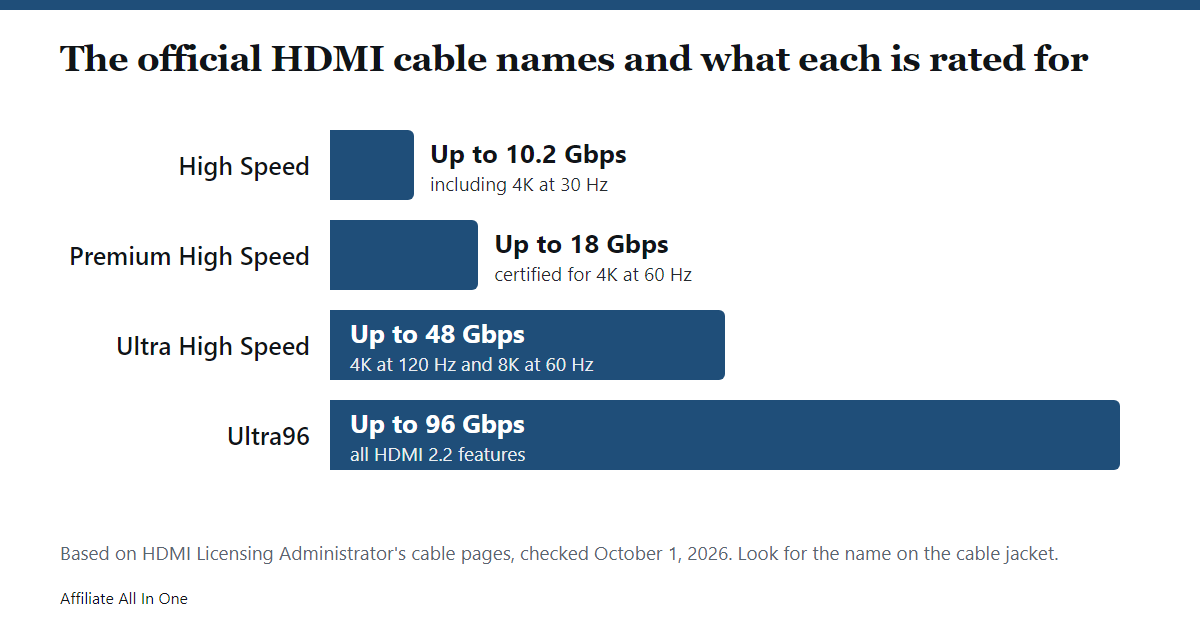
HDMI LA describes these cable types, and it requires the official name on the jacket of every HDMI cable.
| Official name | What HDMI LA says it is for |
|---|---|
| Standard HDMI Cable | Tested for 1080i and 720p. HDMI LA says it does not support later resolutions, refresh rates or bandwidth needs. |
| High Speed HDMI Cable | Up to 10.2 Gbps, including 1080p and 4K at 30 Hz. |
| Premium High Speed HDMI Cable | Certified for 4K at 60 Hz at up to 18 Gbps, with HDR and wider color. Identified by a Premium certification label. |
| Ultra High Speed HDMI Cable | Introduced with HDMI 2.1 and sold from 2020. Systems up to 48 Gbps, 8K at 60 Hz and 4K at 120 Hz. |
| Ultra96 HDMI Cable | Introduced with HDMI 2.2. Up to 96 Gbps and all HDMI 2.2 features. |
The Forum said in 2013 that existing High Speed cables could carry HDMI 2.0, while HDMI LA’s certification for 18 Gbps and 4K at 60 Hz is the Premium program. Our reading: many older High Speed cables may work at 4K 60 Hz, but only a Premium or Ultra High Speed cable has been tested for it.
How to check a cable in four steps
- Read the jacket. HDMI LA says the cable name must be printed on the outer jacket, so look for “Ultra High Speed” there.
- Read the package. HDMI LA says certified Ultra High Speed and Ultra96 cables carry a certification label on every package or unit of sale.
- Scan the label. HDMI LA says a standard QR code app can scan it. The HDMI Forum names its HDMI Cable Certification app, on the Apple App Store and Google Play, for this, and HDMI LA says a scan shows the brand, model and length.
- Check online listings. HDMI LA says optional verification banners on shopping sites can be clicked or scanned for the same details.
Appearance is not a test. Neither HDMI LA nor the Forum gives a way to tell an Ultra High Speed cable by its thickness or connector, and HDMI LA warns that some cables on the market are counterfeit. If a cable has no name and no label, you cannot show from the cable itself that it is rated for 48 Gbps.
Length is part of the certification. HDMI LA says each length within a model line has to pass testing and be certified on its own, so a label on a 3 ft cable says nothing about a 15 ft one. We found no maximum cable length in the HDMI sources we read. If you need a long run, buy a cable certified at that length and scan its label.
Will a cable work in an older port?
Yes, with a limit. The HDMI Forum says the Ultra High Speed cable is backward compatible and works with the HDMI devices already on the market, and HDMI LA says the same of the Ultra96 cable. Our reading: the signal runs at the lowest level that the source, the TV port and the cable all support, so a 2.1 cable in a 2.0 port gives you 2.0 features, A cable that is not rated for the job is one of the things Sony tells PS5 owners to check when 4K at 120 Hz fails.
Is your TV port the problem?
On many TVs only some HDMI inputs support the newest features, so the port you pick matters. The makers say:
- Sony: use a port that supports HDMI 2.1 and check the TV’s manual, because HDMI 2.1 support may need a change in the TV’s settings. Sony also says not every TV with HDMI 2.1 has ALLM, so check the manual for that feature too.
- Samsung (Canada support page): for 4K at 120 Hz, connect to the HDMI port marked with a gaming controller icon. Some models have more than one such port, and Samsung advises a 2.1 HDMI cable.
- Apple: some TVs support HDR on only some inputs, such as HDMI 2 or 3, and you may need to turn on a setting that can be named Ultra, Deep or Enhanced instead of HDR10 or Dolby Vision.
Sony adds two more links in the chain. A receiver or other equipment between the console and the TV can affect the signal. Microsoft makes the same point for 4K at 120 Hz through an AV receiver: use the supplied Ultra High Speed cable, and ask the receiver’s maker if problems continue.
No 4K 120 Hz or a flickering picture: a checklist
This list follows Sony’s troubleshooting steps for a blank screen or a 1080p 120 Hz result, with the Xbox and Apple points added.
- Does the TV claim 4K at 120 Hz? Check its specification, and update its firmware.
- Is the cable the supplied one, or an Ultra High Speed cable rated for 4K 120 Hz? Sony recommends the cable that came with the console, and Microsoft says to use the supplied cable if 4K at 120 Hz fails through a receiver.
- Is the console connected directly to the TV? Take out any receiver, switch or splitter to test. Apple says HDMI switch boxes and splitters may interfere with the signal.
- Is it plugged into the TV’s HDMI 2.1 port? See the section above, and check the TV’s settings for that input. LG’s game-mode page, for example, says its game optimization mode needs the HDMI Ultra HD Deep Color option switched on for the port in use.
- Check the console’s output settings. On a PS5, Sony says Resolution should be Auto or 2160p, Video Transfer Rate should be Auto, and 120 Hz Output should be on. On an Xbox, the path is Profile and system, Settings, General, TV and display options, with Resolution set to 4K UHD and Refresh rate set to 120 Hz.
- For flicker, lower the transfer rate. Sony says a setting of -1 or -2 limits 4K at 120 Hz output, which may improve picture quality. It is a way to stop flicker, not a fix, because you give up 120 Hz.
- On an Apple TV 4K, run the built-in test. Apple says Settings, then Video and Audio, then Check HDMI Connection runs a two-minute test of the cable connection on a 4K TV.
HDMI 2.2 and Ultra96: should you wait?
The Forum released HDMI 2.2 on June 25, 2025. It raises the maximum to 96 Gbps and added a feature name, Ultra96, which makers can use for products that support 64, 80 or 96 Gbps. The Forum says products showing the name require the Ultra96 cable. HDMI LA says the Ultra High Speed cable continues to cover systems up to 48 Gbps, and says only the Ultra96 cable covers every HDMI 2.2 feature.
Our reading: unless a TV, monitor or console lists HDMI 2.2 or Ultra96 in its specification, a certified Ultra High Speed cable already covers what it can do. We did not check which products on sale support HDMI 2.2.
HDMI or DisplayPort for a monitor?
VESA publishes its own numbers. VESA says DisplayPort 1.4’s top data rate, HBR3, totals 32.4 Gbps on four lanes, with a usable payload of 25.92 Gbps. DisplayPort 2.1, released October 17, 2022, adds UHBR rates, and VESA says its DP80 cables support a maximum throughput of 80 Gbps and DP40 cables 40 Gbps. VESA also says simple adapters let VGA, DVI and HDMI devices connect via DisplayPort.
Our reading: DisplayPort 1.4’s 32.4 Gbps sits between HDMI 2.0 and 2.1 on paper, and DisplayPort 2.1’s top rate is above HDMI 2.1’s, so neither is automatically better. What counts is the version and ports on your monitor and graphics card, since TVs and consoles use HDMI. For the USB-C side of this, see our USB-C video guide, and for hubs with an HDMI port, see our hub vs dock guide.
Frequently Asked Questions
Is HDMI 2.0 enough for 4K?
For 4K at 50 or 60 Hz, yes. The HDMI Forum describes HDMI 2.0 as supporting 4K at 50 and 60 Hz, and Apple asks for an HDMI 2.0 or later cable for 4K HDR on an Apple TV 4K. For 4K at 120 Hz you need HDMI 2.1.
Can I use an HDMI 2.1 cable on an HDMI 2.0 port?
Yes. The HDMI Forum says the Ultra High Speed cable is backward compatible and can be used with existing devices. The connection will run at the limits of the older port.
How do I tell if my HDMI cable is 2.1?
Look for “Ultra High Speed HDMI Cable” on the jacket and the certification label on the package, then scan the label to confirm it. HDMI LA gives no way to tell from the look of the cable.
Do I need HDMI 2.1 for a PS5 or Xbox Series X?
Only for 4K at 120 Hz. Sony and Microsoft both say that needs an HDMI 2.1 TV port and an Ultra High Speed cable. Microsoft says 120 Hz is available at lower resolutions without HDMI 2.1.
Does HDMI 2.1 support 4K at 120 Hz?
Yes, the HDMI Forum lists 4K at 120 Hz among HDMI 2.1’s formats. Whether your TV does it depends on the port, and Samsung and Sony both point to specific ports.
Does HDMI 2.1 support 1440p at 240 Hz?
Our arithmetic puts it at about 21 Gbps for 8-bit color before overhead, inside the 48 Gbps maximum and above HDMI 2.0’s 18 Gbps. Whether your monitor and graphics card offer it is a matter of their specifications.
Do all HDMI 2.1 cables support eARC?
HDMI LA says a certified Ultra High Speed cable is tested for it, and that it supports eARC along with the other HDMI 2.1 features. We found no source that tests cables sold only as “2.1” without the certification.
Is HDMI 2.2 worth waiting for?
It only matters if you plan to buy a device that lists HDMI 2.2 or Ultra96. HDMI LA says the Ultra High Speed cable still serves systems up to 48 Gbps.
How long can an HDMI cable be?
The HDMI sources we read give no maximum. They say each length of a certified cable is tested separately, so choose a certified cable in the length you need.
Sources
All pages were checked on October 1, 2026.
- HDMI Forum: HDMI Forum Releases Version 2.0 of the HDMI Specification (September 4, 2013)
- HDMI Forum: HDMI Forum Releases Version 2.1 of the HDMI Specification (November 28, 2017)
- HDMI Forum: HDMI Forum Releases Version 2.2 of the HDMI Specification (June 25, 2025)
- HDMI Forum: News archive, listing the January 6, 2025 announcement of version 2.2
- HDMI Forum: Ultra High Speed HDMI Cable Certification Program
- HDMI Licensing Administrator: HDMI cable types
- HDMI Licensing Administrator: Ultra96 HDMI Cable and Ultra High Speed HDMI Cable
- HDMI Licensing Administrator: Ultra96 feature name
- HDMI Licensing Administrator: HDMI 2.2 Specification overview
- HDMI Licensing Administrator: Ultra High Speed HDMI Cable Certification Labels Available Now
- HDMI Licensing Administrator: Make Sure HDMI Products Are Licensed and Certified
- PlayStation Support: How to change PS5 console resolution
- Xbox Support: Set up 4K gaming at 120 Hz on Xbox Series X
- Apple Support: Set up your Apple TV 4K or Apple TV HD (published November 19, 2025)
- Apple Support: About 4K, HDR, HDR10+ and Dolby Vision on your Apple TV 4K (published October 31, 2025)
- Apple Support: Apple TV 4K (3rd generation) technical specifications
- Samsung Canada: Use Game Mode on your Samsung TV
- LG USA Support: How to turn on Game Optimizer
- VESA: HBR3 early certification program (January 4, 2017)
- VESA: VESA Releases DisplayPort 2.1 Specification (October 17, 2022)
- VESA: About DisplayPort
Spotted something out of date? See our corrections policy, or browse more Electronics guides.
Sources and last update
This article is written from official and primary sources, such as government agencies, standards bodies and manufacturer documentation, and is checked against them when it is updated. It is based on research, not hands-on testing. See how we research and our editorial policy.
Last updated: October 15, 2026