Affiliate disclosure: This guide contains links to RAVPower. If you buy through them, we may earn a commission at no extra cost to you. It does not change what we write: the charging facts below come from USB-IF and Apple, not from any brand. See our Affiliate Disclosure.
How this guide was written: It was researched with AI assistance from the official pages listed under Sources, and every point was checked against those pages on September 29, 2026. We did not test any charger or cable. Wattage figures for phones and laptops are Apple’s, because Apple publishes them; other makers publish their own. See how we research.
Short answer: USB-C is only the connector. How fast a device charges depends on the charger, the cable and the device all supporting USB Power Delivery (USB PD) at a high enough wattage. Apple says an 18W or higher USB-PD adapter fast charges iPhone 15 and later, and 40W or more for the newest Pro models. Laptops can need far more, and USB PD now goes up to 240W.
Key takeaways
- Match the wattage. Check what your device’s maker recommends, then use a charger and cable rated at least that high.
- Check the cable, not just the charger. USB-IF’s certified cable logos show a 60W or 240W rating, and the higher tier needs a cable built for it.
- Extra ports share power. Apple says a charger with more than one port, or a hub with other devices connected, might deliver less to each.
- Buy certified. USB-IF advises buying products that carry its certified logos from trusted sources.
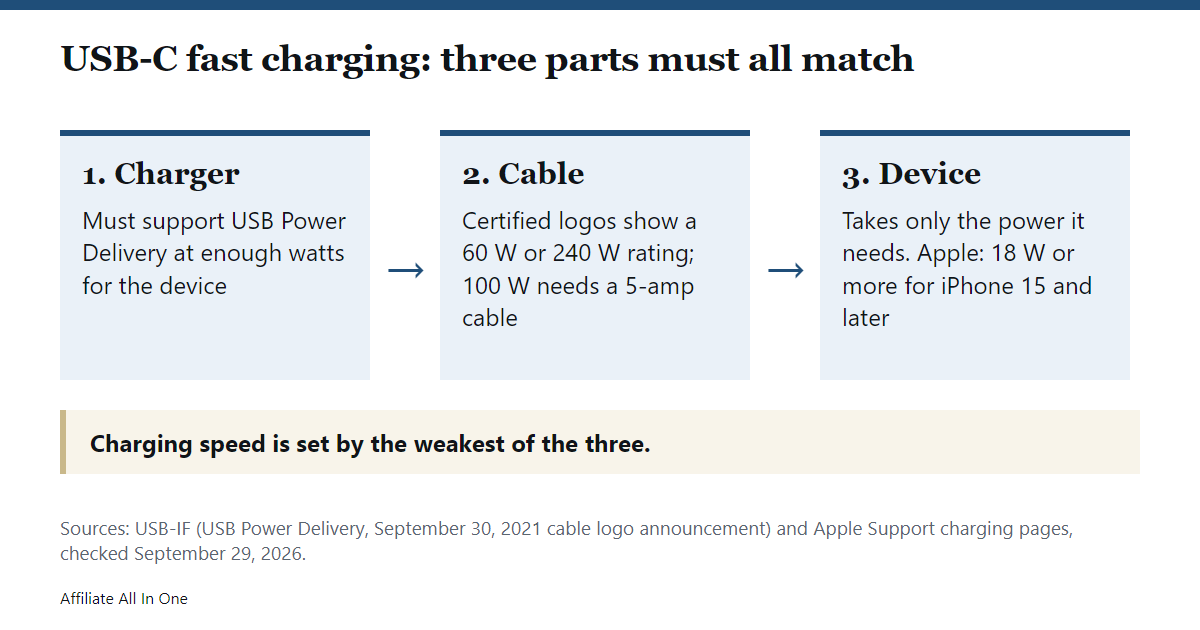
USB-C, USB PD and wattage: what each one means
The USB Implementers Forum (USB-IF), the group behind the USB standards, explains that USB Power Delivery is the specification that lets devices negotiate power over a USB Type-C cable. Its Revision 3.1, announced in 2021, raised the limit to 240W. Before that update, USB PD topped out at 100W, using 20 volts and cables rated for 5 amps. The new higher levels use 28, 36 and 48 volt options for 140W, 180W and 240W, and an adjustable voltage mode lets a device ask for voltages in between.
Two practical ideas follow from the USB-IF’s description. Devices take only the power they need, and a monitor with a wall supply can power or charge a laptop while it displays. That is why the same USB-C port can charge a pair of earbuds slowly and a laptop quickly.
How many watts does your device want?
Apple publishes the clearest numbers, so this table uses them. Other brands’ phones and laptops have their own requirements, so check your maker’s page. Charge times are Apple’s test results and vary with conditions.
| Device | What Apple says |
|---|---|
| iPhone 15 and later | Use a USB-C cable and an 18W or greater USB-PD adapter |
| iPhone 17e and iPhone Air | 20W adapter or higher: up to 50% in around 30 minutes |
| iPhone 17, 17 Pro, 17 Pro Max | 40W adapter or higher: up to 50% in around 20 minutes |
| iPhone 18 Pro and Pro Max | Apple’s 40W Dynamic Power Adapter (60W max), or a third-party 60W-capable adapter that supports USB-PD 3.2 with Adjustable Voltage Supply: up to 50% in around 15 minutes |
| MacBook Neo | 20W USB-C adapter |
| MacBook Air (2022 or later) | 30W (13-inch only), 35W dual-port, 67W or 70W adapters |
| 14-inch MacBook Pro (2021 or later) | 67W, 70W or 96W adapters |
Apple adds that you can charge a Mac laptop with any USB-C power adapter or display that supports USB PD, but recommends at least the wattage of the adapter that suits your Mac for the best experience.
Cables: what the ratings mean
The cable is the part people forget. USB-IF says 100W charging uses cables rated for 5 amps, and that the USB Type-C specification was updated to define the requirements for 240W cables. In 2021 it also introduced certified cable power rating logos that state whether a cable supports 60W or 240W, and it reminds buyers to look for certified logos on the packaging, product brief or the cable itself.
| What you see | What it tells you |
|---|---|
| USB-IF certified cable logo showing 60W | The cable is certified for up to 60W of USB PD |
| USB-IF certified cable logo showing 240W | The cable is certified for up to 240W of USB PD |
| No power rating at all | Our advice, not USB-IF’s: do not assume it can carry high wattage |
For iPhone, Apple says to use the USB-C cable that came in the box, and its testing notes for the iPhone 18 Pro say wired fast charging needs a 60W-capable USB-C cable.
Why charging is slower than expected
- The charger has more than one port. Apple says the maximum output might be reduced depending on the combined power needs of everything connected.
- The charger is USB-A. Apple says iPhone 15 and later charge at a maximum of 7.5W from a USB-A charger.
- It is a hub or a car port. Apple says charge ports in USB hubs or cars might charge slower than a dedicated USB-C charger.
- The charger is underpowered. iOS 18 and later can show a Slow Charger message when a higher-wattage charger could help, which Apple says does not mean anything is wrong.
- It is too hot or too cold. Apple says fast charging might not work in extreme temperatures, and that heavy app use can slow charging.
Safety: what to check
USB-IF advises buying certified USB products from trusted sources, and Apple says third-party adapters and displays should meet applicable regulations and safety standards. In practice: look for the maker’s stated wattage, a certification logo where the product carries one, and a seller with a clear return policy.
If you are shopping for a charger or cable
RAVPower’s official store lists USB-C cables with 60W and 100W ratings in their product names, and a 65W GaN travel adapter with four ports. Check the exact wattage and certification on the page before you buy, and compare it with the table above. We have not tested these products. You can see RAVPower’s chargers or its USB-C cables on the official store.
Frequently Asked Questions
Is USB-C the same as fast charging?
No. USB-C is the connector. Fast charging depends on the charger, the cable and the device all supporting USB Power Delivery at a high enough wattage, according to the USB-IF’s description of the standard.
What wattage charger does my iPhone need?
Apple says 18W or more for iPhone 15 and later, 20W for iPhone 17e and iPhone Air, 40W or more for iPhone 17 models, and a 40W or 60W-capable adapter for the iPhone 18 Pro models. See the table above.
Can I charge my laptop with my phone charger?
Apple says any USB-C adapter or display that supports USB PD can charge a Mac laptop, but it recommends at least the wattage of the adapter meant for your Mac. A weaker charger may charge much more slowly.
Do I need a special cable for fast charging?
Use one rated for the wattage you need. For iPhone, Apple says to use the cable from the box, and USB-IF’s certified logos show 60W or 240W cable ratings.
Why does my charger slow down when I plug in a second device?
Apple says a charger with more than one port might deliver less power to each device, depending on the combined needs of everything connected.
Sources
All pages were checked on September 29, 2026.
- USB-IF: USB Charger (USB Power Delivery)
- USB-IF: Certified USB Type-C cable power rating logos (press release, September 30, 2021)
- Apple Support: Fast charge your iPhone
- Apple Support: About iPhone charge speeds (published March 16, 2026)
- Apple Support: Use a power adapter with your Mac
Spotted something out of date? See our corrections policy, or browse more Electronics guides.
Sources and last update
This article is written from official and primary sources, such as government agencies, standards bodies and manufacturer documentation, and is checked against them when it is updated. It is based on research, not hands-on testing. See how we research and our editorial policy.
Last updated: October 2, 2026