Affiliate disclosure: This guide contains two affiliate links to BleeqUp, a maker of AI sports camera glasses. If you buy through them, we may earn a commission at no extra cost to you. It does not change what we write: the product details below are the makers’ own statements, labelled as such. The other brands mentioned have no affiliate links from us. See our Affiliate Disclosure.
How this guide was written: It was researched with AI assistance from the makers’ own product pages, Apple Support and the Khronos Group, listed under Sources, and checked against them on September 30, 2026. We did not test any glasses. Prices change often and sales are common, so we list none. See how we research.
Short answer: “AR glasses”, “XR glasses”, “display glasses” and “AI glasses” are overlapping sales terms, not strict categories. In practice there are two main kinds: display glasses that plug into a phone or laptop by USB-C and show its screen as a large virtual screen, and AI glasses with a camera, microphones and speakers that work with a phone app. Some AI glasses also show text on the lens.
Key takeaways
- XR is the umbrella term. The Khronos Group, which maintains the OpenXR standard, describes AR and VR as collectively known as XR.
- The same words mean different products. Makers call glasses that show a plugged-in device’s screen “AR glasses”, and call camera-and-voice glasses “AI glasses”.
- Display glasses need a source device with USB-C video output. INAIR says compatibility varies by brand and model and that it cannot guarantee every device works.
- AI glasses lean on a phone app. The makers we checked describe companion apps, and BleeqUp lists some video features for selected phones only.
What the words mean
“XR” is not a separate kind of glasses. Khronos, the standards group behind OpenXR, describes AR and VR, collectively, as XR. In our reading, search terms such as “XR glasses” and “display glasses” are used alongside “AR glasses” for the same kind of product. Reading the makers’ own product names and descriptions gives three practical groups:
| Type (our grouping) | What you see | Where the content comes from | Connection | Examples from makers’ pages |
|---|---|---|---|---|
| Display glasses, often sold as “AR” or “XR” glasses | A large virtual screen | The device you plug in: phone, laptop, handheld or console | USB-C cable | INAIR 2 Pro |
| AI glasses with a display | Text or graphics on the lens, such as translation, a teleprompter or notifications | The glasses’ own software, working with your phone | Phone app | INMO GO3; Rokid lists a “With Display” model |
| AI or camera glasses without a display | Nothing on the lens; you hear replies and use the camera | The glasses and your phone | Phone app | Rokid Ai Glasses Style (Non-Display); BleeqUp Ranger |
The makers do not agree on terms, so treat the grouping as a way to read a product page, not as an official standard. VR headsets and standalone spatial computers are outside this guide.
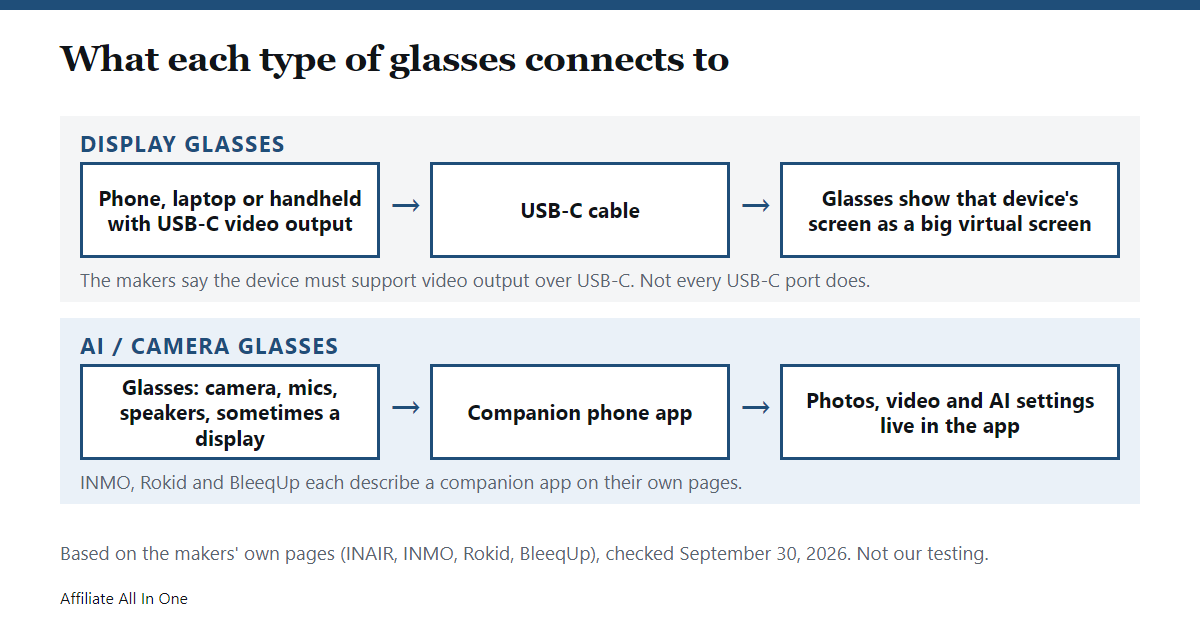
Display glasses: what they do and what they need
Display glasses are essentially a screen you wear. The content is not created in the glasses: it comes from whatever you plug in. INAIR’s product page describes its INAIR 2 Pro as giving a 135-inch, 120 Hz personal display when connected to a smartphone or PC. The specifications it lists are:
- Field of view: 46 degrees
- Clarity: 49 pixels per degree
- Refresh rate: 120 Hz
- Binocular resolution: 3840 x 1080
- Weight: 80 g
- Connection: USB-C
These are the maker’s figures, not our measurements. The important line for buyers is on INAIR’s FAQ: the glasses need a device with USB-C video output, and because compatibility varies by brand and model, INAIR says it cannot guarantee every device will work. A USB-C port alone does not settle it. Our USB-C fast charging guide covers the power side of USB-C; video output is a separate feature that a port may or may not have.
Which devices does INAIR list?
- iPhone: INAIR’s page gives two slightly different statements, one listing iPhone 15, 16 and 17 series and excluding iPhone 14 and earlier, iPhone SE, iPhone 16e and iPhone Air, and another saying iPhone 15 series and above. Check the maker’s current list for your exact model.
- Android: phones and tablets with a USB-C port that supports DisplayPort output. Its list names some flagship models and says it excludes most Redmi and POCO models.
- Computers: Macs with M-series chips and Windows laptops with a DisplayPort-enabled USB-C port.
- Gaming: Steam Deck and Windows handhelds connect directly. A Nintendo Switch needs INAIR’s separate Hub adapter.
Apple’s own support page (published September 17, 2026) says these iPhones support connecting to an external display over USB-C: iPhone 15 models, iPhone 16 models except iPhone 16e, iPhone 17 models except iPhone 17e, and iPhone 18 Pro models. It says iPhone uses the DisplayPort protocol for this and that the external display mirrors the iPhone’s screen. Whether a given pair of glasses accepts that signal is a question for the glasses’ maker.
AI glasses: with and without a display
AI glasses put a camera, microphones and speakers in a normal-looking frame, and some add a small display in the lens. They run their own software and pair with a phone. The details below are each maker’s statements about specific models.
| Product | Type | What the maker’s page lists | Phone |
|---|---|---|---|
| INMO GO3 | AI glasses with a display | Live translation shown on the lens (98+ languages online; offline for 9 languages on Android and 13 on iOS), an AI assistant, a teleprompter, navigation and phone notifications on the lens, a camera for photos and video up to 60 seconds, replaceable batteries | Page says compatible with iOS and Android; voice replies play through the phone speaker or an optional INMO speaker |
| Rokid Ai Glasses Style (Non-Display) | AI glasses without a display | About 38 g, a 12 MP first-person camera, hands-free voice assistance for questions, translation and recognizing what you see | Rokid’s site describes a Rokid AI App for setup, media and AI services |
| BleeqUp Ranger | AI sports camera glasses | 16 MP camera, 120 degree field of view, IP54 rating, open-ear audio with 4 speakers and 5 microphones, 8 hours of audio or 1 hour of recording on the glasses, up to 5 hours of recording with the optional 1,600 mAh Power Plus | Page says high-frame-rate video (including 3K60) works on selected iOS and Android devices; see its compatibility table |
The BleeqUp page describes a camera and audio, and does not describe a display in the lens. If you want to read the maker’s own details, here is the BleeqUp Ranger page and its AI sports glasses collection (both sponsored links). It is a sports camera, so it fits a different need from INMO’s translation and teleprompter features.
INMO says its photos and videos carry a watermark automatically. The AI glasses above all have cameras, so check the rules for recording where you will use them; we did not review any recording laws.
Limits to know before you buy
Pulling together what the makers’ own pages say, these are the limits we found. They are the makers’ statements, not our testing.
- Display glasses need the right source device. INAIR says the glasses need a device with USB-C video output and that it cannot guarantee every device works. For an iPhone, Apple says the external display mirrors the iPhone’s screen.
- Compatibility lists can disagree. INAIR’s page gives two slightly different iPhone lists, so use the maker’s current one.
- AI glasses depend on a phone. The makers describe a companion app, and BleeqUp lists some video features, including 3K60, for selected phones only.
- Recording is limited. INMO lists video up to 60 seconds with an automatic watermark. BleeqUp lists 1 hour of recording on the glasses, or up to 5 hours with its optional Power Plus.
- Not every pair has a display. Rokid’s Non-Display model and the BleeqUp Ranger describe a camera and audio, not a display in the lens.
- Cameras come with rules. We did not review recording laws.
We found no independent test data on comfort or eye strain in the sources we read, so this guide does not cover them.
What to check before buying
- Does it have a display? Look for wording such as “Non-Display” or “With Display” in the product name, as Rokid uses.
- For display glasses, check the video output on your device. Use the maker’s compatibility list for your exact model, not just “it has USB-C”.
- For AI glasses, check phone and app support. Some features are listed for selected phones only.
- Look at battery and charging accessories. The makers above list swappable batteries, cases or add-on power packs.
- Ask about prescription lenses. INAIR, INMO, Rokid and BleeqUp each list a prescription option, and the details differ.
- Read the price at checkout. Sales and bundles change often.
Frequently Asked Questions
What is the difference between AR glasses and smart glasses?
There is no official line. In our reading of makers’ pages, “AR glasses” usually means display glasses that show a plugged-in device’s screen, while “smart” or “AI glasses” usually means glasses with a camera, microphones and speakers that pair with a phone, sometimes with a display in the lens.
What does XR mean?
The Khronos Group describes AR and VR, collectively, as XR. It is an umbrella term rather than a type of glasses.
What do display glasses connect to?
A device with USB-C video output. INAIR lists Android phones and tablets with DisplayPort output, iPhone 15 and later, M-series Macs, Windows laptops with a DisplayPort-enabled USB-C port, and handhelds such as the Steam Deck. It says a Nintendo Switch needs its Hub adapter.
Do iPhones work with display glasses?
Apple says iPhone 15 models, 16 models except 16e, 17 models except 17e and 18 Pro models can connect to external displays over USB-C. The glasses’ maker decides whether its glasses accept that signal, and INAIR’s own page gives two slightly different iPhone lists, so check the current one.
Do AI glasses need a phone?
The makers we checked all describe a phone app or phone connection: INMO says its photos and videos transfer to your phone, Rokid describes an app for setup and AI services, and BleeqUp describes an app and lists video features for selected phones. We did not find any of them clearly describing full use without a phone.
Sources
All pages were checked on September 30, 2026.
- INAIR: INAIR 2 Pro product page, specifications, FAQ and compatibility list
- INMO: INMO GO3 product page
- Rokid: Rokid Ai Glasses Style (Non-Display) product page
- BleeqUp: Ranger AI Sports Camera Glasses product page
- Apple Support: Charge and connect with the USB-C connector on your iPhone (published September 17, 2026)
- Khronos Group: OpenXR
Spotted something out of date? See our corrections policy, or browse more Electronics guides.
Sources and last update
This article is written from official and primary sources, such as government agencies, standards bodies and manufacturer documentation, and is checked against them when it is updated. It is based on research, not hands-on testing. See how we research and our editorial policy.
Last updated: October 9, 2026