How this guide was written: It was researched with AI assistance from the Epson, BenQ and ViewSonic brightness guides and press pages, the ISO and SMPTE standards pages and reports, and the Stewart Filmscreen, Screen Innovations and Elite Screens pages on screen gain, all listed under Sources, and checked against them on October 8, 2026. We did not test or measure any projector or screen. The size table is our own arithmetic, labeled as such. This guide has no affiliate links. Epson, BenQ and ViewSonic sell the projectors they describe, and the screen makers sell screens, so their pages describe their own products. See how we research.
Short answer: ANSI lumens are a projector’s brightness measured by one agreed method, so they are the number to compare. Figures labeled just “lumens,” “LED lumens” or “light source lumens” can be far higher for the same projector. How many ANSI lumens you need depends on screen size and room light: a dark room needs a few hundred on an 80-inch screen, and a bright room or daylight needs thousands. Work out the screen brightness you want in nits first, then the lumens.
Key takeaways
- Brightness labels are not interchangeable. BenQ’s page gives examples of a projector rated 1,000 ANSI lumens next to a rival listing 2,400 “LED lumens,” and says an ANSI figure can be only about 4% to 6% of a light-source figure.
- Look for a named method. Epson says it states white brightness by ISO 21118 and color brightness by IDMS 15.4. A listing with no method named is harder to trust.
- Lumens are light output, not picture brightness. The same projector looks ten times dimmer on a screen with ten times the area, according to BenQ’s example. Nits measure what you actually see.
- Room light changes the target. BenQ’s table runs from 50 nits in a dark room to 600 or more outdoors in indirect sunlight. SMPTE’s cinema targets sit near the dark-room end.
- Our arithmetic gives a minimum, not a safe number. A 100-inch screen at 300 nits needs about 2,600 lumens in ideal conditions. BenQ’s own chart asks for about 3,100.
- The screen counts too. Gain is how much light the screen reflects compared with a standard white surface. Higher gain looks brighter but narrows the viewing angle.
What are ANSI lumens, and how do they differ from “lumens”?
A lumen is the SI unit for the total visible light a source gives off. BenQ describes ANSI lumens as a way to measure a whole projector rather than just its light source, and ViewSonic calls it the industry-standard method. In BenQ’s description, the projector shows a white image, the screen is divided into nine equal zones, an illuminance meter reads the center of each zone, and the average is multiplied by the screen area. That is BenQ’s description of the method. We did not read the ANSI text itself.
The trouble is that other numbers also use the word “lumens.” This table follows BenQ’s explanations, plus Epson’s for the last row. Both are projector sellers, so treat the judgments as theirs.
| Label on the box | What it is, per the makers |
|---|---|
| ANSI lumens | Whole-projector white light, averaged over nine screen zones. |
| ISO lumens (ISO 21118:2020) | BenQ says it also uses a nine-zone average and adds a rule that production units must reach at least 80% of the rated brightness. Epson says it uses ISO 21118 for white brightness. |
| CVIA lumens | A standard from the China Video Industry Association. BenQ says it also uses nine zones and limits color temperature, color deviation and the 80% rule. |
| LED lumens | BenQ says a small number of brands use their own method, not certified by an international body, and gives a rough rule of dividing by 2.4 to estimate ANSI lumens, based on figures the makers disclosed. |
| Light-source lumens | The light produced by the lamp, laser or LED itself, before the optics. BenQ says to multiply it by 0.04 to 0.06 to estimate ANSI lumens, depending on the panel, and that some sellers of single-panel LCD projectors use it as the headline number. |
| Color brightness | Epson says it is measured separately, by IDMS 15.4, and that when only one number is shown it is typically the white figure, with color brightness sometimes about a third of it. |
The ISO standard’s public page is short. It says the document specifies the information that must be included in specification sheets for front-projection data projectors, it was last reviewed and confirmed in 2025, and a revision is under development. We did not buy the text, so the nine-zone and 80% details above are the makers’ descriptions.
Can you trust the lumens number on the box?
Epson says no, not always. In press releases about lawsuits it brought against projector sellers, Epson says one seller corrected a listing from 95,000 lumens to 95, another settled after a listing of 18,000 lumens was corrected to 140, and a court entered a default judgment in a case where Epson says the measured light was less than 1% of a claimed 9,500 lumens. These are Epson’s own accounts, from a company that competes with those sellers, and we have not seen the court records. Epson says shoppers should be careful with labels such as “Lamp Brightness,” “Lux,” “LED lumens” and “CVIA” when no standard method sits behind them, especially on online marketplaces.
The picture is not one-sided. ViewSonic explains that ANSI brightness alone may not describe LED and laser projectors with strong colors, because of the Helmholtz-Kohlrausch effect: people see highly saturated colors as brighter than less saturated ones at the same measured level. ViewSonic gives both an ANSI figure and an adjusted “lumens” figure for its LED projectors, and says its 2.4 times average perceived-brightness ratio was measured on its own projectors, so others may differ. BenQ agrees the effect exists but says it helps less with white, gray and unsaturated content, and that room light dilutes it. So a projector with vivid colors may look brighter than its ANSI rating, but that is an extra, not a replacement for a standard number.
What to check on a listing, as our summary of the maker pages:
- Is the figure labeled ANSI or ISO, or just “lumens”?
- Is there a color brightness figure as well as white?
- Does the number fit the type of light source? A very large figure on a small, cheap projector deserves a second look.
- Does the maker publish how it was measured?
Why do lumens not tell you how bright the picture looks?
Lumens count the light leaving the projector. What you see is the light coming back off the screen per unit of area. That is nits, or candelas per square meter. BenQ’s example: projecting onto 1 square meter looks ten times brighter than spreading the same light over 10. Lux is lumens per square meter, according to BenQ, and foot-lamberts are the older unit used in cinema standards.
That is why the cinema targets matter. SMPTE’s 2014 study group report, summarizing its own documents, lists a center-screen luminance of 12 to 22 foot-lamberts for film in indoor theaters and 16 foot-lamberts, give or take 2, for review rooms. It lists 14 foot-lamberts, give or take 3, for digital cinema, and says colour timing is done at a peak luminance of 48 candelas per square meter. Converting with the standard factor of about 3.43, 14 to 16 foot-lamberts is about 48 to 55 nits. A bright living room needs several times that to stay watchable.
How many lumens do you need? What the makers say
The makers’ advice does not agree, and it is built around their own products. Here are the three we read:
| Maker | Guidance |
|---|---|
| Epson | At least 1,500 lumens for a home theater with minimal ambient light. At least 2,500 for rooms such as classrooms, meeting rooms and those with windows. More for large auditoriums. |
| ViewSonic | Under 3,000 ANSI lumens for home use in dark rooms. 3,000 to 3,999 for small meeting rooms or classrooms. 4,000 to 4,999 for medium spaces with some ambient light. 5,000 and up for large rooms, 100 inches or bigger, or high ambient light. |
| BenQ | Target screen brightness by room: 50 nits dark room, 100 dim, 200 lit room, 300 to 400 bright room, 600 or more outdoors in indirect sunlight. Then match it to screen size. BenQ’s worked example: 300 nits on a 100-inch picture, its bright-room level, calls for at least 3,100 lumens. |
Epson’s 1,500-lumen minimum for a home theater is much higher than the arithmetic below suggests for a dark room. Our reading is that a maker’s minimum includes a margin for lamp aging, screen losses and picture modes, and it assumes you may want the lights on. It is a reasonable buying floor, not a physical requirement.
Our arithmetic: how many lumens for your screen size and room
For a plain matte white screen with a gain of 1.0, the screen brightness in nits is roughly the projector’s lumens divided by (pi times the screen area in square meters). The table inverts that for a 16:9 screen. It is our own calculation, not from any maker, and it assumes an ideal screen, a perfectly even image and no losses. Real rooms and projectors lose some light, so treat it as a minimum.
| Screen brightness target | 80-inch screen | 100-inch screen | 120-inch screen |
|---|---|---|---|
| 50 nits (dark room) | 280 | 430 | 620 |
| 100 nits (dim room) | 550 | 870 | 1,250 |
| 200 nits (lit room) | 1,110 | 1,730 | 2,490 |
| 300 nits (bright room) | 1,660 | 2,600 | 3,740 |
| 600 nits (outdoors, indirect sunlight) | 3,330 | 5,200 | 7,480 |
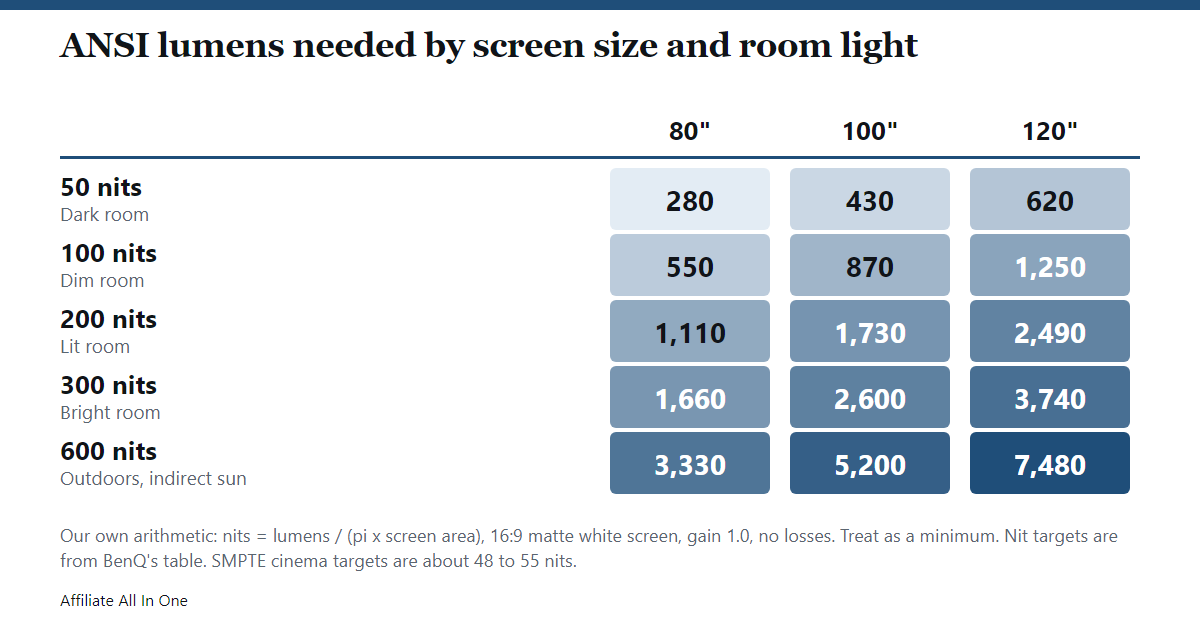
How it compares with the makers: BenQ’s chart asks for about 3,100 lumens for a 100-inch image at 300 nits, about 19% above our ideal 2,600. That gap is a rough idea of the real-world margin, but it is one maker’s figure for one case. The 50-nit row sits close to the SMPTE cinema targets of about 48 to 55 nits. Because the target is per square meter, going from 80 to 120 inches roughly doubles the lumens needed for the same brightness.
Does the screen make a difference?
Yes. Stewart Filmscreen explains that gain compares how much light a screen reflects with a standard white board: 1.0 reflects the same, 1.5 reflects 50% more, and a gray screen rated 0.8 reflects 80%. By our arithmetic, a gain of 1.3 would need roughly 1/1.3, about 77%, of the lumens in our table, before the viewing-angle trade-off below. Screen Innovations adds that higher-gain screens have a narrower usable viewing angle, and that very reflective flat screens can show hot spots where part of the image looks brighter than the rest. Elite Screens says a gain of 1.3 or higher helps in a bright room but that going too far can cause hot-spotting. It also describes ambient-light-rejecting screens, which use special surfaces to send the projector’s light toward the viewer and bounce room light away. All three sell screens, so this is their own guidance.
How can you get a brighter picture without a new projector?
The sources point to four levers:
- Shrink the image. BenQ’s area example applies. Less area gives more nits from the same light.
- Cut the room light. ViewSonic says controlling ambient light is crucial when the projector is under about 3,000 ANSI lumens. BenQ says room light also dilutes color saturation.
- Change the screen. A higher-gain or ambient-light-rejecting screen, as the screen makers describe, can make the picture look brighter. Mind the viewing angle.
- Check a lamp projector’s age. ViewSonic says lamp projectors lose brightness over time, while LED and laser models hold it more steadily.
We did not find a source that quantifies picture-mode or power-saving settings, so we do not give a number for them.
Is 1,000, 2,000, 3,000 or 5,000 lumens enough?
Using the table above, our reading is:
- About 500 ANSI lumens. Roughly 58 nits on a 100-inch screen and 90 nits on an 80-inch one in ideal conditions, so a dark or dim room only.
- About 1,000. Around 115 nits on 100 inches in ideal conditions. Fine for a darkened room, not for a bright one.
- About 3,000. Around 350 nits on 100 inches in ideal conditions, close to BenQ’s bright-room range, and about 240 nits on 120 inches. Good with the lights on, not enough for outdoor sun.
- About 5,000. Gets a 100-inch image to about 580 nits in ideal conditions, close to BenQ’s 600-nit figure for indirect sunlight outdoors. Direct sun is harder, and none of the sources we read give a target for it.
Frequently Asked Questions
What are ANSI lumens?
A measure of a projector’s total white light output, averaged over nine zones of a projected image, as BenQ describes it. It is the figure most projector makers use so buyers can compare.
Are lumens and ANSI lumens the same?
Not necessarily. A plain “lumens” figure may be a light-source or LED figure measured another way, and can be much higher than the ANSI number for the same projector. Check which method the listing names.
How many ANSI lumens is 10,000 lumens?
There is no standard conversion. BenQ suggests dividing an LED figure by 2.4 and multiplying a light-source figure by 0.04 to 0.06, and says the rate varies. Epson says some claims it tested were a small fraction of the number advertised. If a listing gives only one large number, look for the ANSI or ISO rating.
Can lumens be converted to nits?
Only if you know the screen size and gain. Lumens are total light and nits are light per area. For a matte screen, our table uses nits = (lumens × gain) ÷ (pi × screen area in square meters).
How bright is 500 ANSI lumens?
About 58 nits on a 100-inch screen in ideal conditions, or 90 nits on 80 inches. That is near the cinema targets, so it suits a dark room.
Is 3,000 ANSI lumens enough for daylight?
For a bright indoor room on about 100 inches, our arithmetic gives roughly 350 nits, which is in BenQ’s bright-room range, with some loss in real life. Outdoors in sunlight BenQ’s target is 600 nits or more, which needs well over 3,000 lumens at 100 inches.
Can a projector be too bright?
For a dark room and a small screen, yes in the sense that it is far above the 48 to 55 nits cinema targets. ViewSonic also notes that higher lumens are not always better and that lower-lumen models can give better color when lighting is controlled.
What is color brightness?
Epson’s name for the brightness of colors, measured separately from white. Epson says the color figure can fall to about a third of the white one, so a single number can overstate how bright colors look.
Does an LED or laser projector look brighter than its ANSI rating?
It can, with vivid or saturated content, because of the Helmholtz-Kohlrausch effect, according to ViewSonic and BenQ. BenQ says the boost is smaller with white and gray content and in rooms with ambient light.
Is a higher-gain screen better?
It makes the picture look brighter, but narrows the viewing angle and can show hot spots, according to Screen Innovations, Stewart and Elite Screens. It matters most when the room is light.
Sources
All pages were checked on October 8, 2026. Pages without a publication date are listed without one.
- ISO: ISO/IEC 21118:2020, Information to be included in specification sheets for data projectors
- Epson US: Projector Guide, Color Brightness
- Epson US newsroom: Epson Settles Projector Brightness Lawsuit (May 5, 2025)
- Epson US newsroom: Epson Granted Default Judgement in Deceptive Advertising Lawsuit (February 1, 2024)
- BenQ US: What Are ANSI Lumens? A Simple Guide to Projector Brightness Units (May 8, 2025)
- BenQ US: ANSI Lumens vs Lumens, How to Convert Brightness
- BenQ US: Why ANSI Lumens Shouldn’t be the Last Word for Projector Brightness
- ViewSonic Library: Projector Brightness Guide, What Are Projector Lumens?
- ViewSonic Europe: Understanding the Difference Between ANSI Lumens and Lumens
- SMPTE: 20F Technology Committee On-Screen Light Measurement Study Group Report (August 14, 2014)
- Stewart Filmscreen: What is gain?
- Screen Innovations: Frequently Asked Questions, Screen
- Elite Screens: Bright Room Projector Screen vs. Standard Screen (June 2025)
Spotted something out of date? See our corrections policy, or browse more Electronics guides.
Sources and last update
This article is written from official and primary sources, such as government agencies, standards bodies and manufacturer documentation, and is checked against them when it is updated. It is based on research, not hands-on testing. See how we research and our editorial policy.
Last updated: October 19, 2026