How this guide was written: It was researched with AI assistance from the Google Nest, ecobee, Honeywell Home and Sensi support and product pages and from ENERGY STAR, all listed under Sources, and checked against them on October 8, 2026. We did not test any thermostat, adapter or heating and cooling system, and we did not install anything. This guide has no affiliate links. Several of these makers sell the adapters and kits described here, and their pages describe their own products. See how we research.
Short answer: Some smart thermostats work without a C-wire and some do not, and the answer depends on the model and on your heating system. The makers’ own pages say heat-only, cool-only, zoned and heat-pump systems need a C-wire or a power accessory from the maker. If you have none, the usual routes are an unused wire in your wall cable, a maker’s power adapter at the furnace, or a professional running a new wire. Check your wiring with the power off before you buy.
Key takeaways
- A C-wire only supplies power. Google says it does not control heating or cooling. It gives the thermostat constant power, so a screen and Wi-Fi can stay on.
- “No C-wire needed” has conditions. Sensi’s two battery-powered models work on most conventional systems without one, but need one on heat-only, cool-only and heat-pump systems. Honeywell says its T5 and T6 Pro WiFi models require one.
- Wire colors are not a reliable guide. Sensi says blue and black are common for the C-wire but the color is not standard. Google tells you to go by the label on the connector instead.
- A spare wire only helps if both ends are connected. It has to reach the C terminal on the thermostat and the C terminal on the furnace or air handler board.
- Makers sell fixes, and the fixes differ. ecobee has a Power Extender Kit, Google has a Nest Power Connector and Honeywell has a C-wire adapter. Google warns that certain adapters from other companies can cause problems for a Nest thermostat or damage it.
- Turn the power off first. The wiring goes to the heating and cooling equipment, and Google says to switch off the breaker and test that the system is really off.
What does a C-wire do on a thermostat?
The “C” stands for common. Google puts it simply: unlike the other thermostat wires, a C-wire does not tell the system to heat or cool. Its only job is to give the thermostat constant power. A basic programmable thermostat can run on batteries. ENERGY STAR notes that a smart thermostat needs steadier power to keep its Wi-Fi connection and touch screen working, and says that most, but not all, smart thermostats take that power through a C-wire from the system’s control board.
Honeywell says the wire must be connected to the common terminal on the furnace control board as well as on the thermostat, and describes it as the 24-volt supply for the thermostat. Google describes a different way to cope: its Nest thermostats use very little power, and in many homes they can draw enough from the heating and cooling wires. That is why one brand can run without a C-wire in your house while another cannot.
Sensi lists the usual terminal letters. Treat the colors as common, not guaranteed:
| Terminal | What it does (per Sensi) | Common wire color |
|---|---|---|
| C | Common: constant 24-volt power for the thermostat | Blue or black |
| R, Rc, Rh | 24 volts from the transformer. Rc supplies cooling and Rh supplies heating | Red |
| G | Fan | Green |
| Y | Air conditioning | Yellow |
| W | Heat | White |
How do you know if your home has a C-wire?
The makers describe much the same steps. Our summary:
- Switch the power off at the breaker. Google notes a system can have more than one breaker. To test that it is really off, change the temperature by at least 5 degrees and wait at least 5 minutes, since many systems hold off for a few minutes before starting.
- Remove the faceplate and photograph the wires. Google says to take a picture with the labels readable before you touch anything. Sensi says most faceplates simply pull straight off.
- Look at the C terminal. A wire of any color in a connector labeled C means you have one. Google says to enter the connectors that hold wires and ignore the wire colors.
- Look for spare wires. Google says most systems do not use every wire in the bundle that comes out of the wall. Sensi says to check an unused wire’s color against the wiring diagram of your system. Honeywell says the wire has to land on the C terminal at the equipment end too, so a spare wire that goes nowhere does not help. Google adds that unlabeled wires that were never connected to your old thermostat typically are not connected to the system at the other end, so look at the control board before you assume anything.
- Check the control board when in doubt. Google calls the board’s labels a very reliable way to identify an unknown wire. It is inside the furnace or air handler, so you will have to open a panel with the power off.
Two traps appear in Google’s guidance. A wire on a terminal marked B is usually a heat-pump wire, but on some systems it is really the common wire. If your thermostat has a separate C connector, Google says the B wire belongs on the Nest O/B connector. Without a separate C connector, a blue B wire most likely is the common wire and a brown one most likely belongs to a heat pump, though Google says this is not foolproof and should be cross-checked. Putting a common wire into the wrong connector can blow a fuse in your equipment or damage the thermostat, according to Google.
The makers also give rough age guidance. Sensi says houses under about 40 years old usually have wiring that suits a smart thermostat, and ENERGY STAR says smart thermostats suit most forced-air systems installed after 1975. Both are rules of thumb, not a substitute for looking. Google, ecobee and Sensi each offer an online compatibility checker or wire picker that takes the terminal labels you find.
Which smart thermostats need a C-wire?
This is where the makers’ pages disagree, and where most shoppers go wrong. A “no C-wire required” label usually has a condition attached.
| Maker | What its own page says |
|---|---|
| Google Nest | Often works from the heating and cooling wires. For heat-only, cool-only, zoned and heat-pump systems, a C-wire or a power accessory such as the Nest Power Connector is required. The Google Home app tells you during setup. |
| ecobee | Most installs do not need the Power Extender Kit. If you have no C-wire but at least four wires at the thermostat, the kit makes one. Every model includes it in the box apart from the Smart Thermostat Essential and Smart Thermostat Lite, which sell it separately. |
| Honeywell Home (T5 and T6 Pro WiFi) | Require a C-wire so the thermostat can power itself instead of using batteries. Honeywell says newer WiFi models include a C-wire adapter and older ones need one bought separately. |
| Sensi (Sensi and Sensi Lite) | Run without one on most standard heating and cooling setups, but need one on heat-only, cool-only and heat-pump systems. On a heat-only or cool-only setup with no C-wire, the Wi-Fi connection can drop after about two hours. |
| Sensi (Touch and Touch 2) | Always require a C-wire. |
Our reading of these pages: the models marketed as “no C-wire needed” are usually the ones that can fall back on batteries or on the heating and cooling wires, and the easy cases are a furnace plus air conditioner on conventional wiring. The harder the system, the more likely you need a C-wire. ecobee adds that it left the kit out of the box for two of its models, Smart Thermostat Essential and Smart Thermostat Lite, because fewer than 15% of installs used it. That is the company’s own figure.
What are your options if you have no C-wire?
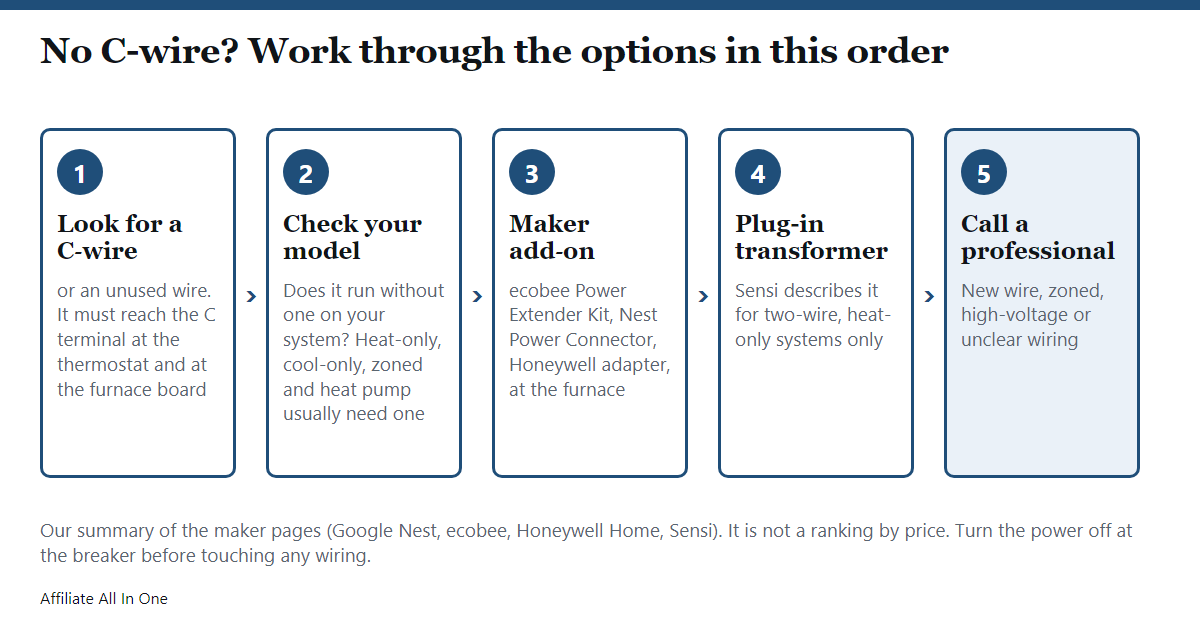
These are the routes the maker pages describe, roughly from least to most effort. Which ones apply depends on your thermostat and your system, so check your maker’s page for your exact model.
| Option | What the makers say |
|---|---|
| Use an unused wire | Google and Sensi both put this first. Connect it to the C terminal at the thermostat and at the control board, and check it against your system’s wiring diagram. |
| Choose a model that does not need one | Sensi says its Sensi and Sensi Lite models are battery-powered and can skip the C-wire on conventional systems. Check the system type first, because the exceptions above still apply. |
| Maker add-on at the furnace | ecobee’s Power Extender Kit goes on the control board and combines the work of the Y and G wires into one wire, which frees a wire to act as the C-wire. Google’s Nest Power Connector also installs at the furnace or air handler. Honeywell’s C-wire adapter is for its WiFi thermostats. |
| Use the fan (G) wire | Sensi says this can work “in some cases” and that its app walks you through which wires can be converted. The other makers’ pages we read do not list it as an option, so ask your maker before trying it. |
| Plug-in 24-volt transformer | Sensi describes this for a two-wire, heat-only system, on its Sensi, Touch and Touch 2 models but not the Lite. It involves cutting the RH/RC jumper on the thermostat and says the transformer wires stay visible unless run behind the wall. It does not suit combined heating and cooling or cool-only systems. |
| Run a new wire or hire a professional | Google says a pro can run a new C-wire, which it calls potentially expensive, or fit the Power Connector. ecobee says its kit costs much less than hiring an electrician for a new wire. Neither gives a price we could check. |
Details that matter when you read the add-on pages. The ecobee kit works only with 24-volt systems and only with ecobee thermostats, and millivolt, high-voltage, dual-transformer, fan coil and communicating systems are not compatible. Google says the same about millivolt and high-voltage systems for the Nest Power Connector, and that if your system has no C terminal you will need a pro to install it. Google warns that certain adapters from other companies can cause problems or harm a Nest thermostat, even ones advertised as compatible, and recommends its own Power Connector. When we looked on October 8, 2026, Honeywell’s stand-alone adapter page showed the item as sold out and listed a second version as discontinued, so check that the add-on you want is still sold before you plan around it. Google also says that if the setup power test reports “Low power”, you can ask for a Power Connector at no charge. Offers like that can change, so confirm it in the app.
What about heat-only, two-wire, heat-pump and baseboard systems?
These are the cases where “no C-wire” advice stops being simple.
- Heat-only or cool-only. Google and Sensi both list these as needing a C-wire or an accessory. Google notes that heat-only systems often have no control board. In that case you find where the thermostat wiring meets the furnace and install the Power Connector there. Sensi’s plug-in transformer option is for two-wire heat-only systems.
- Heat pumps. Google lists heat pump systems as needing a C-wire or the Power Connector, and Sensi says its Sensi and Sensi Lite thermostats need one on a heat pump. Google also says some thermostat connectors have two labels, one for conventional systems and one for heat pumps, so make sure you know which you have. Wiring a heat-pump system to the wrong labels can cause a malfunction or possibly damage it.
- Zoned systems. Google and Sensi both list zone systems as needing a C-wire. For homes with more than one thermostat, Google says the connector goes at the zone controller.
- Baseboard and in-wall heaters. If your old thermostat has thick wires with wire nuts and is labeled 120 V or 240 V, it is a high-voltage system. Google and Sensi say their thermostats are not compatible, and ENERGY STAR says most smart thermostats in the U.S. market do not work with baseboard or in-wall heaters. Google says a professional may be able to fit a step-down transformer to make some systems compatible.
- Oil boilers and furnaces. ENERGY STAR says these may need an adapter.
What happens if a thermostat doesn’t get enough power?
Google lists the symptoms it associates with an inconsistent supply. They run from mild to disruptive:
- Battery life drops, the display will not turn on, motion sensing is disabled, or the thermostat drops off Wi-Fi.
- The system turns on or off unexpectedly, chatters, clicks or thumps, or runs heating or cooling without stopping.
- Heating or cooling switches on and off again within a short time, or the fan runs constantly or cycles.
- A “Delayed” message appears, or an error code such as E1, E297, N260 or N261 shows. Google gives N410 and N411 for the Nest Learning Thermostat (4th gen).
Google’s Power Connector page adds that when a Nest thermostat is short of power it can switch off features such as the remote sensor, Matter support and occupancy detection. Sensi’s own page links a missing C-wire on a heat-only or cool-only system to Wi-Fi dropping out after about two hours. These symptoms can have other causes, so use them as a reason to check the power, not as a diagnosis. We did not find a maker figure for how long a Nest battery lasts without a C-wire.
What if something goes wrong after you connect it?
Google’s steps for a C-wire that is not getting power are short. Switch the breaker off, take the thermostat display off its wall plate and check that the C-wire is pushed all the way in, then restore power. If it still reports no power, Google recommends calling a professional. If connecting a wire to the C terminal made the system misbehave, check that the wire is fully seated at the thermostat and connected to the C terminal on the control board, then check again with the power back on.
For the Nest Power Connector, Google says to finish installing the thermostat first, then fit the connector at the furnace or air handler with the power off. If the thermostat will not turn on after that, it points to checks such as the equipment cover (some systems have a safety latch), the breaker, the fuses and loose connections. Google also says installation may involve ladders or small spaces and to avoid doing it alone at home.
What does it cost, and is it worth doing yourself?
No maker gives a single installed price, and we found no independent installer quote we could check, so we do not give one. What the pages do say: Google calls a new wire run by a pro potentially expensive and the Power Connector usually simpler and more affordable, and ecobee says its kit costs much less than an electrician running a new wire. Both are the sellers’ own comparisons.
The makers treat the work differently. Google says that if you are comfortable troubleshooting and take precautions you might fix it yourself, and recommends a professional for anything you are unsure about. ENERGY STAR advises hiring a professional if your heating and cooling is zoned, multi-stage or variable-speed, because those setups need a thermostat built for them. If your wiring looks nothing like the diagrams, or the labels are numbers or letters such as 1, 2, 3 and A, B, C, D, Google says those systems are incompatible with its thermostats.
Frequently Asked Questions
Can I use a smart thermostat without a C-wire?
Sometimes. Sensi says its Sensi and Sensi Lite models work without one on most conventional systems, and Google says Nest thermostats can often draw enough power from the heating and cooling wires. Heat-only, cool-only, zoned and heat-pump systems usually need a C-wire or an accessory.
What color is the C-wire?
Often blue or black, according to Sensi, but the color is not standard. Go by the label on the terminal, not the color.
Do Nest thermostats need a C-wire?
Not always. Google says the app will tell you during setup, and that heat-only, cool-only, zoned and heat-pump systems need either a C-wire or Google’s Power Connector.
Does ecobee need a C-wire?
ecobee says most installations do not need its Power Extender Kit. When there is no C-wire and at least four wires at the thermostat, the kit supplies the connection. Every model includes it apart from the Smart Thermostat Essential and Smart Thermostat Lite.
Does the Honeywell T5 need a C-wire?
Honeywell says the T5 and T6 Pro WiFi models require one. Its page also says a C-wire adapter is included with newer WiFi thermostats and that older models can use a separately bought adapter.
Can I use the G wire as the C-wire?
Sensi says it can work in some cases and that its app guides you. The other makers’ pages we read do not offer it as an option, so check your own model’s instructions before trying it.
How do I add a C-wire to a thermostat?
Connect an unused wire at both the thermostat and the control board, use the maker’s power adapter at the furnace, or have a professional run a new wire. Always turn the power off at the breaker first.
What happens if a thermostat has no C-wire?
It depends on the model. Google lists symptoms such as a draining battery, a display that will not turn on, dropped Wi-Fi, clicking noises and heating or cooling that cycles on and off. Sensi says heat-only and cool-only systems can lose Wi-Fi after about two hours.
Can I use a smart thermostat on a two-wire, heat-only system?
Possibly, with extra power. Google lists heat-only systems as needing a C-wire or the Power Connector, and Sensi describes a plug-in 24-volt transformer for two-wire heat-only systems on some of its models.
Is a C-wire adapter the same as a power extender kit?
They solve the same problem in maker-specific ways. ecobee’s kit combines the Y and G wires at the furnace to free a wire for the C connection, and ecobee says its kit works only with ecobee thermostats. Google says the Power Connector is for its Nest models. Use the one your thermostat’s maker names.
Sources
All pages were checked on October 8, 2026. Pages without a publication date are listed without one. Honeywell Home shows “Last updated: September 2, 2025” on the support pages below.
- Google Home and Nest Help: Learn about the common or C wire
- Google Home and Nest Help: Nest Power Connector
- Google Home and Nest Help: Nest thermostat compatibility
- Google Home and Nest Help: Identify a thermostat wire
- ecobee: Power Extender Kit
- ecobee: Installing your Smart Thermostat Essential
- Honeywell Home: Do the T5/T6 Pro WiFi model thermostats require a “C” wire? (updated September 2, 2025)
- Honeywell Home: Will the Lyric T5 WiFi Thermostat work without a C wire being installed? (updated September 2, 2025)
- Honeywell Home: Do I need a C wire to install my new thermostat? (updated September 2, 2025)
- Honeywell Home: C-Wire Power Adapter
- Sensi: What is a C-Wire or Common Wire and How do I Know if I Have One?
- Sensi: Does my Sensi thermostat need a common wire, or “c-wire”?
- Sensi: Thermostat C-Wire Installation
- Sensi: Will Sensi Thermostats Work with my HVAC System?
- Sensi (Canada site): Adding 24 VAC External Transformer in Place of C wire
- ENERGY STAR: How to Choose a Smart Thermostat
- ENERGY STAR: Smart Thermostats
Spotted something out of date? See our corrections policy, or browse more Electronics guides.
Sources and last update
This article is written from official and primary sources, such as government agencies, standards bodies and manufacturer documentation, and is checked against them when it is updated. It is based on research, not hands-on testing. See how we research and our editorial policy.
Last updated: October 18, 2026